Buying a mechanical keyboard in 2026 means sorting through layouts you have never typed on, switch names that sound like paint colors, and a wireless mechanical keyboard market that runs from $50 plastic trays to aluminum slabs with smart displays. The problem is not a shortage of options. It is that most product pages list features without telling you which ones actually change how a board feels after the first week. A 96% layout, a tenkeyless board, and a compact 84-key deck can all carry the same switch and still suit completely different desks.
This guide covers six boards that span that range: three Keychron wireless models, a SteelSeries hybrid mechanical board with an OLED display, a renewed Logitech low-profile wireless keyboard, and a budget 75% hot-swap deck. The goal is to match the board to the way you actually work, whether that is eight hours of code, an evening of games, or both on the same desk.
Related: Wireless vs wired mechanical keyboards: what actually matters
Quick answer
The Keychron K8 Tenkeyless Wireless Mechanical Keyboard is the strongest fit for most people who split time between a Mac and a Windows PC because it pairs Bluetooth wireless with a Type-C wired mode, Brown switches, and a tenkeyless layout that leaves room for a mouse. Choose the Keychron K4 instead when you want a number pad without giving up the compact footprint.
Mechanical keyboards worth comparing
What separates these six boards is not brand prestige, it is layout, switch family, and how the board connects. A full number pad, a tenkeyless frame, a compact 84-key deck, and a 75% board all occupy different amounts of desk space, and that decision is harder to undo than a switch swap. Connectivity matters just as much: some of these run on Bluetooth with a wired fallback, while others are wired only. The grid below keeps each product, image, and link matched to the same verified listing.
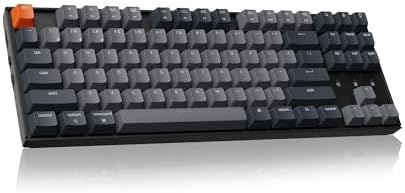
Keychron K8 Tenkeyless Wireless Mechanical Keyboard for Mac, White Backlight, Bluetooth, Multitasking, Type-C Wired Gaming Keyboard for Windows with Brown Switch
Check current Amazon price
A tenkeyless wireless board with Bluetooth and a Type-C wired mode, Brown switches, white backlight, and Mac and Windows layouts with multitasking keys.
Visit on Amazon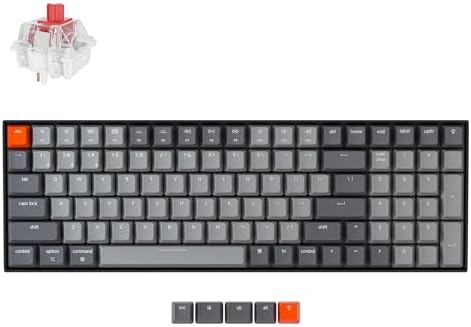
Keychron K4 96% Layout 100 Keys Wireless Bluetooth 5.1/Wired USB Mechanical Gaming Keyboard with Keychron Super Brown Switch White LED Backlight N-Key Rollover for Mac Windows PC-Version 2
A 96% layout that keeps the number pad while trimming the surrounding frame, with Bluetooth 5.1, wired USB, Keychron Super Brown switches, white LED backlight, and N-key rollover.
Visit on Amazon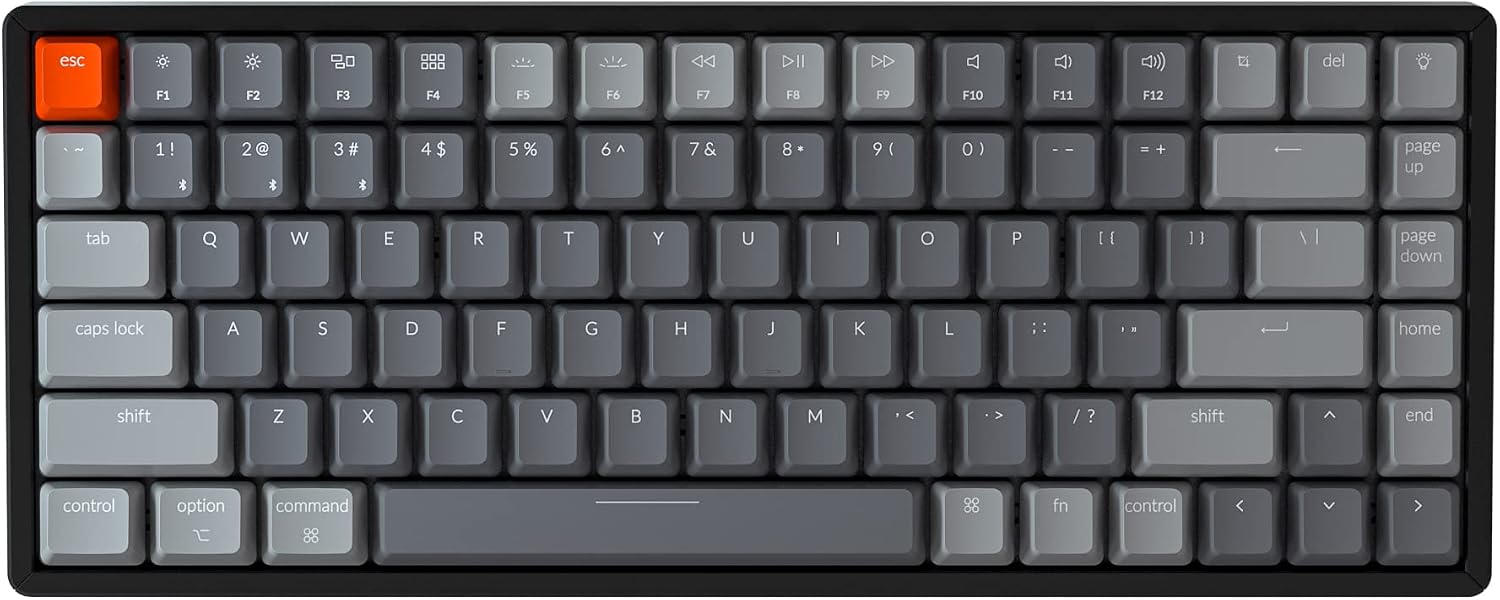
Keychron K2 Version 2 Wireless Gaming Mechanical Keyboard, Bluetooth/USB Wired Compact 84 Keys RGB LED Backlit N-Key Rollover Aluminum Frame for Mac Windows, Gateron G Pro Brown Switch
Check current Amazon price
A compact 84-key deck with an aluminum frame, Bluetooth and USB wired modes, RGB LED backlighting, N-key rollover, and Gateron G Pro Brown switches for Mac and Windows.
Visit on Amazon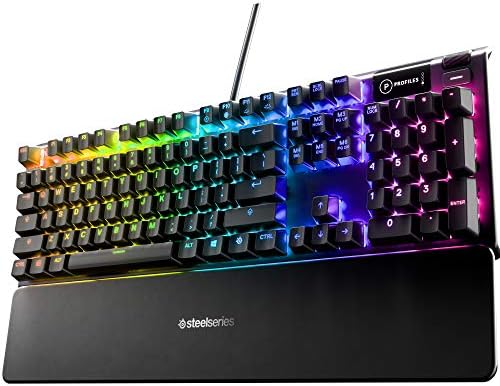
SteelSeries USB Apex 5 Hybrid Mechanical Gaming Keyboard, Per-Key RGB Illumination, Aircraft Grade Aluminum Alloy Frame, OLED Smart Display (Hybrid Blue Switch)
A wired hybrid mechanical board with an aircraft grade aluminum alloy frame, per-key RGB illumination, an OLED smart display, and hybrid blue switches.
Visit on Amazon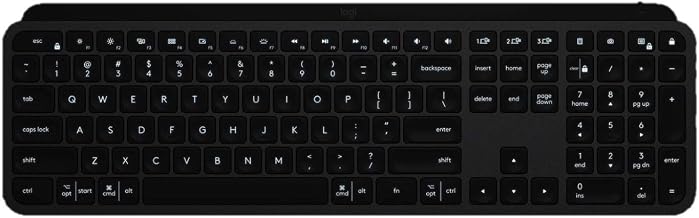
Logitech USB-C MX Keys Advanced Wireless Illuminated Keyboard - Graphite (Renewed)
A low-profile wireless illuminated keyboard in graphite with USB-C charging, sold as a renewed unit rather than a new retail box.
Visit on Amazon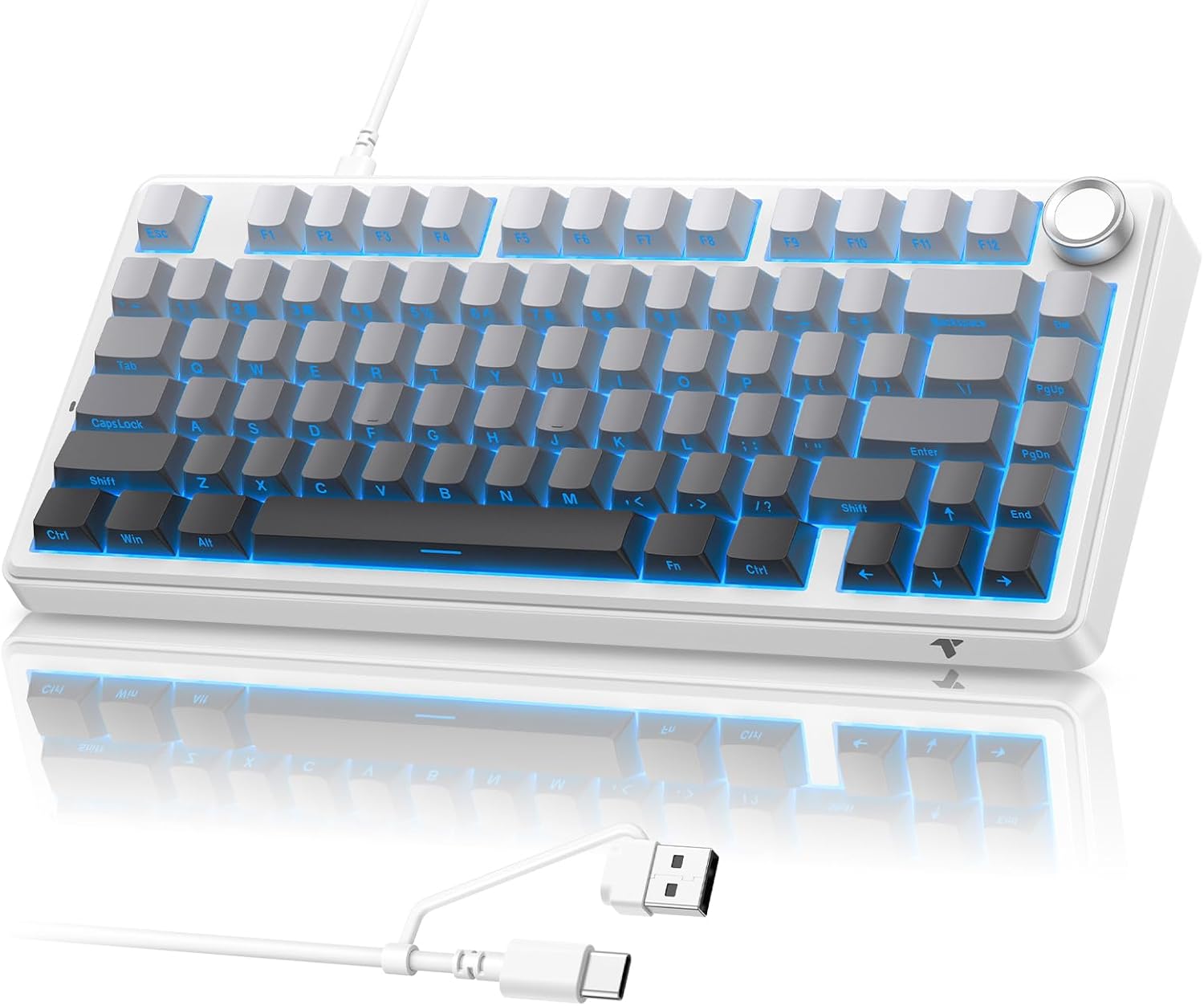
TECURS 75% Wired Gasket Mechanical Keyboard, Hot Swap Gaming Keyboard
A wired 75% board built around a gasket mount and hot-swap sockets, aimed at buyers who want to change switches without soldering.
Visit on AmazonPrices and availability may change. Check the retailer for current details.
How these products were compared
This guide compares five things: layout and key count, switch family, connection options, frame and backlight, and platform support. Those are the differences a spec sheet can actually prove, and they map to the decisions you will live with every day.
Layout and key count come first because they are the hardest to change later. A 100-key 96% board, an 84-key compact deck, a tenkeyless frame, and a 75% board all fit different desks and different workflows. If you type numbers into a spreadsheet all day, losing the number pad is a real cost. If you mostly write and game, a narrower board gives your mouse arm more room and keeps your shoulders square.
Switch family is the second filter. Brown switches are tactile and quiet, which makes them the safer default for shared offices and late-night typing. Blue switches are clicky, with an audible bump that some people love and roommates do not. If you are not sure, tactile is the lower-risk choice.
Connection options decide how the board fits your setup. Bluetooth with a wired fallback means you can move between a laptop and a desktop without replugging, and you can still run wired when the battery is low. A wired-only board never needs charging and never drops a keystroke to a weak signal, which matters if you have a lot of wireless traffic on your desk.
Frame and backlight are where price differences show up. Aluminum frames add weight and reduce flex. Per-key RGB, single-color backlighting, and no backlight at all are three different products, not three settings on one.
Platform support matters more than most buyers expect. Mac and Windows layouts differ in modifier legends and media key placement, so a board that lists both is easier to move between machines.
Product names, images, and retailer links in this article are matched by their Amazon product identifier so that every card points to the exact listing shown. No current prices are printed here, because they move. Use the link on each card to confirm the live price, availability, and return terms before you buy.
How to choose the right mechanical keyboard
Start with the layout question, because everything else is easier to fix. Full-size and 96% boards include a number pad. Tenkeyless boards drop the number pad but keep the arrow cluster and the function row. Compact 84-key boards keep the function row and arrows in a tighter frame. A 75% board compresses the arrow keys and function row into an even smaller footprint, often with a knob or extra keys where the gaps used to be. If you have ever measured your desk and found the mouse has nowhere to go, the 75% and tenkeyless sizes are the fix.
Switch type is the second decision, and it is more personal than any review can settle. Tactile switches like the Brown variants in the Keychron K8, K4, and K2 give you a bump you can feel without a click you can hear. Clicky switches like the hybrid blue switch in the SteelSeries Apex 5 add an audible snap. Low-profile boards like the Logitech MX Keys sit much closer to the desk and use shorter travel, which feels closer to a laptop keyboard than to a traditional mechanical deck.
Then decide how the board connects. If you move between a Mac and a Windows machine, look for a board that lists both layouts plus Bluetooth and a wired mode, so you are not juggling two keyboards. If you game competitively or your desk is crowded with wireless devices, a wired-only board removes battery anxiety and pairing steps entirely.
Hot-swap sockets are worth paying attention to even if you never plan to swap switches, because they let you fix a mushy or noisy switch without replacing the whole board. The TECURS 75% is the board here that advertises hot-swap in its own name. If you want to explore switch swapping in more detail, our hot-swap versus soldered boards explainer walks through what changes.
Finally, check the exact model. Manufacturers sell the same board in multiple switch options, backlight options, and layouts, and the listing title is the only reliable way to confirm which one you are getting. A K8 with Brown switches and a K8 with a different switch are different products with different feel.
Keychron K8 Tenkeyless Wireless Mechanical Keyboard for Mac, White Backlight, Bluetooth, Multitasking, Type-C Wired Gaming Keyboard for Windows with Brown Switch
The K8 is the pick here because it covers the most common setup without asking you to compromise. It is tenkeyless, so you keep the function row, arrows, and a familiar key layout while dropping the number pad and the width that comes with it. It runs Bluetooth for wireless use and Type-C when you want a cable, and it ships with Brown switches, which sit in the tactile middle ground that works for typing and gaming alike.
The multitasking and Mac plus Windows support are the practical details. You get a board that can move between a work laptop and a personal desktop, with modifier legends that match both platforms instead of leaving you to remap keys in software. White backlighting is included, which is enough for dark rooms but is not the same as per-key RGB.
The trade-off is exactly that: no number pad and no RGB. If your work involves heavy numeric entry, the K4 is the better answer. If you want color effects on your desk, the K2 Version 2 or the SteelSeries Apex 5 will scratch that itch. For everyone else, the K8 is the least complicated board to live with, and that is the whole point of a top pick.
Alternatives to consider
The Keychron K4 96% Layout 100 Keys Wireless Bluetooth 5.1/Wired USB Mechanical Gaming Keyboard with Keychron Super Brown Switch White LED Backlight N-Key Rollover for Mac Windows PC-Version 2 is better suited to anyone who needs a number pad but does not want a full-size slab on the desk. The 96% layout keeps 100 keys in a tighter frame, and Bluetooth 5.1 plus wired USB gives you the same dual-mode flexibility as the top pick, along with N-key rollover for simultaneous keypresses.
The Keychron K2 Version 2 Wireless Gaming Mechanical Keyboard, Bluetooth/USB Wired Compact 84 Keys RGB LED Backlit N-Key Rollover Aluminum Frame for Mac Windows, Gateron G Pro Brown Switch is a stronger fit when desk space is the priority and you want RGB. The aluminum frame and 84-key compact layout make it the smallest of the Keychron trio here, and the Gateron G Pro Brown switches keep the tactile feel.
The SteelSeries USB Apex 5 Hybrid Mechanical Gaming Keyboard, Per-Key RGB Illumination, Aircraft Grade Aluminum Alloy Frame, OLED Smart Display (Hybrid Blue Switch), the Logitech USB-C MX Keys Advanced Wireless Illuminated Keyboard - Graphite (Renewed), and the TECURS 75% Wired Gasket Mechanical Keyboard, Hot Swap Gaming Keyboard cover the remaining ground. The Apex 5 is the wired option with per-key RGB and an OLED smart display, plus clicky hybrid blue switches. The MX Keys is the low-profile, quiet, wireless choice, sold as a renewed unit. The TECURS 75% is the budget hot-swap board for buyers who want to try different switches without soldering.
Day-to-day use and maintenance
Mechanical boards are low maintenance, but a few habits keep them feeling new. Dust is the main enemy. A soft brush or a can of compressed air once a month keeps grit out of the switch stems and stops keys from feeling scratchy. If you eat at your desk, tip the board and shake it out regularly rather than letting crumbs settle into the case.
Keycaps come off with a puller, and warm soapy water handles most grime on ABS or PBT caps once they are removed. Let them dry completely before pressing them back on. The case itself should be wiped with a barely damp cloth, never soaked, and liquid should never go anywhere near the switch openings.
For the wireless boards, the K8, K4, K2, and MX Keys, treat the battery the way you treat a phone battery. Charge before it hits zero rather than leaving it plugged in permanently, and turn the board off when you travel with it. If a board supports both Bluetooth and a wired connection, running wired during long sessions saves charge for the days you actually need wireless.
Cables matter more than people admit. The Type-C and USB connections on these boards are the parts most likely to fail first, so unplug by the connector rather than yanking the cord, and coil or loosely loop the cable for storage instead of folding it tight.
One caveat worth stating plainly: hot-swap sockets make switch changes easy, but they are still delicate. Pull switches straight up with the right tool and avoid rocking them side to side, or you can damage the socket and turn an easy swap into a soldering job.
Buying checklist
- Measure your desk and decide whether you can live without a number pad.
- Choose your switch family based on noise and feel, not on what a product page calls "gaming."
- Confirm the connection type you need: Bluetooth with wired fallback, or wired only.
- Check the exact model in the listing title, including switch variant, backlight type, and layout.
- Decide whether hot-swap sockets matter to you, now or later.
- Read the cleaning and care instructions, especially for battery-powered boards.
- Verify the current retailer price, availability, and return terms before ordering.
Final recommendation
Choose the Keychron K8 Tenkeyless Wireless Mechanical Keyboard when you want one board that handles Mac and Windows, wireless and wired, with tactile Brown switches and a layout that leaves room for your mouse. Choose the Keychron K4 when a number pad is non-negotiable and you still want wireless flexibility. Choose the Keychron K2 Version 2 if compact size and RGB matter most, the SteelSeries Apex 5 if you want a wired gaming board with per-key lighting and an OLED display, the Logitech MX Keys if you prefer a quiet low-profile wireless deck, and the TECURS 75% if you want a budget entry into hot-swap switches. Any of the six will type, but only one matches the desk and the workflow you actually have.