Related: Hot-Swap Boards Under $100 That Survive a Work Week
A wireless mechanical keyboard is really three decisions wearing one product page: how many keys you actually use, how the board talks to your computer, and whether you can change the switches without reaching for a soldering iron. Get any one of those wrong and you spend the next year working around it. Get them right and you stop noticing the keyboard at all, which is the whole point.
I write code eight hours a day on whatever board is sitting on my desk, and I have built enough customs to know that a spec sheet tells you almost nothing about how a board feels at 4 p.m. on a Thursday. What follows is the framework I use to sort boards before I ever plug one in: layout math, connection type, switch mounting, and the parts that are expensive to fix after the return window closes.
The four products here cover the realistic spread. A full-size aluminum wireless board, a 98-key wireless board with a display and a knob, a compact 75% wired board that swaps switches, and a sampler pack of switches so you can figure out what you like before you commit to an entire keyboard.
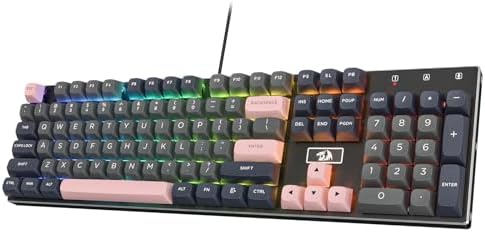
Best Overall: Redragon K556 PRO Wireless RGB
This is the board for someone who uses the number row and the numpad for actual work. A 104-key full-size layout in an aluminum frame with wireless and RGB covers the two things most people underestimate: how often they reach for a numpad, and how much a cable annoys them once it is routed around a monitor arm.
Aluminum is the frame material I want at this size. A full-size plastic board flexes under typing load, and flex is audible. It changes the sound from a knock into a hollow rattle, and no amount of switch swapping fixes a case that rings.
The thing to inspect first on any board in this tier is the stabilized keys: spacebar, both shifts, enter, backspace. Press each one slowly and listen for a metallic ping at the bottom of the travel. That ping is stabilizer rattle, and it is the single clearest tell of where a manufacturer saved money. It is fixable with lube and a little patience, but it is worth knowing before you buy.
Wireless here means you can move the board between a desk and a couch without unplugging anything. If you also game on it, confirm the connection mode you plan to use, because 2.4GHz and Bluetooth are not the same experience.
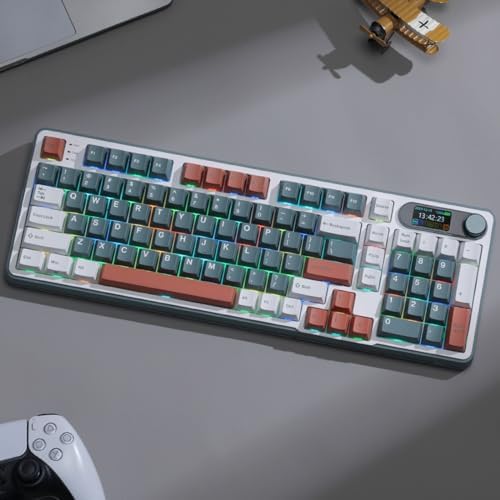
Best Value: RK ROYAL KLUDGE S98 Wireless Mechanical Keyboard
The S98 is the board I would point a spreadsheet-heavy typist toward. A 98-key layout keeps the numpad and the arrow cluster while cutting the dead space between them, so you get full-size function in a footprint that leaves room for a mouse.
The knob is the feature people dismiss and then miss. Volume, scroll, zoom, whatever you map it to, it replaces a keyboard shortcut you currently perform forty times a day. The smart display is the other half of that idea: connection status and battery state without installing software that wants an account.
That last part matters more than it sounds. I have walked away from boards because changing the RGB required a login. A display that shows you what the board is doing is a real quality-of-life feature, not a gimmick, as long as the board still works when the companion app is not running.
Wireless on a board with a display and a knob means there are more things drawing power. If battery life is the reason you are going wireless in the first place, read the manufacturer's numbers and then assume real use is worse.
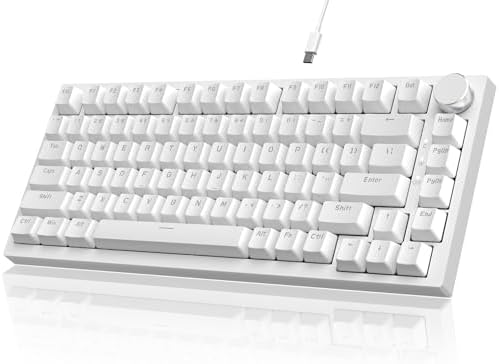
Best Compact: AJAZZ AK820 75% Hot-Swappable
A 75% board is the layout I recommend to most people who are not sure what they want. You keep the function row, the arrow keys, and the main cluster, and you lose only the numpad. That is the smallest number of sacrifices for the largest amount of desk space.
This one is hot-swappable, and that is the feature I consider non-negotiable in 2026. Soldering is a hobby, not a requirement. Hot-swap means the switches are a decision you can revisit in six months instead of a decision you live with until the board dies. It also means a $30 set of switches can make a board feel new again.
Wired is the tradeoff. You give up the couch-to-desk freedom, and in exchange you never think about a battery, a dongle, or a charging cable you forgot to plug in. For a board that lives permanently on one desk, wired is the honest answer most of the time.
Black is the colorway listed here, which is worth noting only because keycaps are where you will eventually spend money. A neutral case color takes almost any keycap set you throw at it.
Best for Finding Your Switch: Kailh Series Switch Sample Pack
This is not a keyboard. It is the cheapest way to stop guessing. Twenty switches from the Kailh series let you press a linear, a tactile, and a clicky side by side before you buy a full set of anything.
Switch feel is personal, and that is not a cop-out. The difference between a light linear and a heavy tactile is not a spec you can reason your way through on a product page. You find out by typing on both for an afternoon.
A sampler also pairs directly with a hot-swap board. If you own the AJAZZ AK820, or any board that takes standard switches, the sampler tells you what to order next. If you do not own a hot-swap board yet, the sampler tells you which one to buy.
How I test
Every board I form an opinion on gets two weeks of daily typing. That is the minimum. Unboxing is not testing, and an afternoon is not enough time for a keyboard to stop being new and start being furniture.
The stabilizer rattle test is the first thing I do. Press the spacebar, both shifts, enter, and backspace slowly, listening for a metallic ping at the bottom of the press. Cheap stabilizers all rattle. Expensive ones sometimes rattle too, and that is worse, because you paid for it.
Then the switch comparison, eyes closed. Same sentence typed on each candidate board, no looking down, listening instead of reading. Sound is half the experience of a mechanical keyboard, and the other half is half your desk, which is why the same board sounds different in two rooms.
The last test is the one that matters: would I use it for a full work week without reaching for something else? If I stop noticing the keyboard by Wednesday, it passed.
Analysis: what actually matters
Wireless versus wired is not a quality question, it is a workflow question. Wireless buys you placement freedom and costs you a battery you have to think about. Wired buys you one less thing to manage and costs you a cable. Neither is better in the abstract.
Hot-swap is where I draw the hard line. If a board is not hot-swappable, every switch decision you make at purchase is permanent until you learn to solder. A hot-swap socket turns the keyboard into a platform you upgrade instead of a product you replace.
Layout is the decision people rush. Count how often you actually use a numpad for a week before you decide you need one. If the answer is daily, buy a 98-key or full-size. If the answer is almost never, a 75% gives you back six inches of mouse room and you will not miss a single key.
Keycap quality tells you more about a board than case material does. Cheap caps feel thin and slick and they make an expensive board feel cheap. A cheap case with good caps beats a good case with cheap caps, every time.
The mechanical keyboard reference table
This is how the four products here line up. Layout is the number of keys you get, connection is how the board talks to your machine, and the notes column is the thing I would check first if I were buying it today.
| Keyboard | Layout | Connection | Notes |
|---|---|---|---|
 Visit on Amazon → Visit on Amazon →Redragon K556 PRO |
Full-size, 104 keys | Wireless | Aluminum frame, check stabilizers first |
 Visit on Amazon → Visit on Amazon →RK ROYAL KLUDGE S98 |
98-key with numpad | Wireless | Smart display and knob |
 Visit on Amazon → Visit on Amazon →AJAZZ AK820 |
75% compact | Wired | Hot-swappable, black |
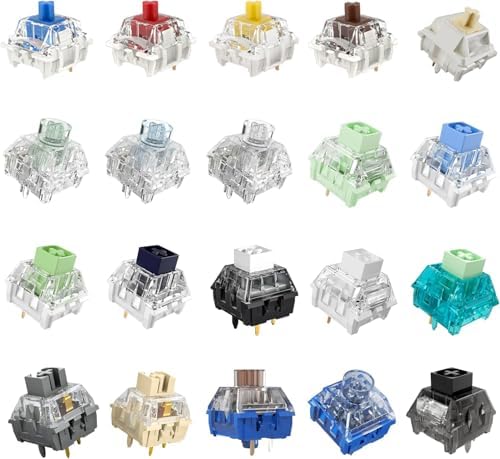 Visit on Amazon → Visit on Amazon →Kailh Switch Sample Pack |
20 switches | Not a keyboard | Test feel before you commit |
Full-size, 98-key, and 75% in plain terms
Full-size gives you everything and takes the most desk. 98-key keeps the numpad and trims the wasted space around it, which is why it has become the default recommendation for people who work with numbers. 75% keeps the function row and arrows and drops the numpad entirely.
There is no universally correct answer, only a correct answer for your hands. If you have never used anything but full-size, a 75% feels wrong for about three days and then feels obvious.
Linear, tactile, and clicky
Linears travel straight down with no bump, and they are the quietest of the three. Tactiles have a bump you feel partway through the press, which is what keeps a lot of typists from bottoming out. Clicky switches add an audible click on top of the bump, and they are the fastest way to lose a roommate.
The sampler pack is how you settle this. Do not take anyone's word for it, including mine.
Should you buy the Redragon K556 PRO?
Buy it if you use a numpad daily and you want the cable gone. A 104-key aluminum wireless board covers layout and placement in one purchase, and the aluminum frame is the part that keeps it from sounding hollow.
Before it ships, plan on checking the stabilized keys. Rattle on the spacebar and shifts is the most common compromise at this price, and it is the first thing I listen for on any full-size board.
Should you buy the RK ROYAL KLUDGE S98?
Buy it if you want full-size function in less space and you like hardware controls. The knob and the smart display are the two features that separate this from a generic wireless board, and both of them work without opening a settings app.
Go elsewhere if you want the absolute smallest footprint. A 98-key board is still wide, and if desk space is your actual constraint, a 75% is the better answer.
Should you buy the AJAZZ AK820?
Buy it if you are not sure what you want yet. Hot-swap means the switches are changeable, 75% means you keep the keys that matter, and wired means one less variable while you learn what you like.
Pair it with the Kailh sampler and you have a complete path: press twenty switches, pick a favorite, install them yourself, and change your mind later without buying a second keyboard. That is the whole hobby in two purchases.