Hot-swappable mechanical keyboards aren't a gimmick, and after four years of daily typing, fourteen custom builds, and one very confused labradoodle who has knocked exactly one board off my desk in his life, I can tell you exactly when they're worth the upgrade and when they're a solution looking for a problem. The short version: if you're spending over $50 in 2026, you shouldn't have to break out a soldering iron to swap switches. Switches are the soul of any keyboard, and soldering them in locks you into one feel for the life of the board. That's not value, that's a subscription you can't cancel.
I'm writing this because the "is hot-swap worth it?" question comes up in my DMs at least twice a week, and most answers online miss the point. They either oversell hot-swap as "future-proofing" (vague) or dismiss it as unnecessary (wrong, mostly). What matters is what hot-swap actually does for you day to day, and what it costs you.
Why you should trust me
I'm Theo. I write code for a living, which means I type eight hours a day, every day, on whatever I'm reviewing. My keyboard shelf at home has 14 builds on it and a drawer of artisans my roommate doesn't know about. I started with a cheap RK61 that drove my ex-girlfriend out of the apartment, and I consider that a fair trade. I've lubed switches, I've tape-modded cases, and I've replaced stabilizers on boards that cost more than my first car. I test every board for two weeks minimum, do a stabilizer rattle test, and do an eyes-closed switch comparison before I write a word.
How I picked and how I tested
My criteria were simple. The board has to be something I could actually type on for a full work week, debug code on, write angry Slack messages on, and not hate by day six. The switches had to be hot-swappable, because in 2026, anything over $50 without hot-swap is a design choice I can't defend. I looked at sound signature first, because sound tells you everything about the mounting, the plate, the foam, and the switches, all the stuff the spec sheet won't say. Then I checked stabilizers, because rattle is the build quality tell. Finally, I tested the wireless (where applicable) and the software, because software is the weakest link on every brand, no exceptions.
I used each keyboard for at least two weeks of real work, then ran the eyes-closed switch comparison and the stabilizer rattle test: spacebar, backspace, and enter at different speeds and angles, listening for any buzz or pinging. I also checked real buyer feedback to make sure my experience matched the pattern.
The short list
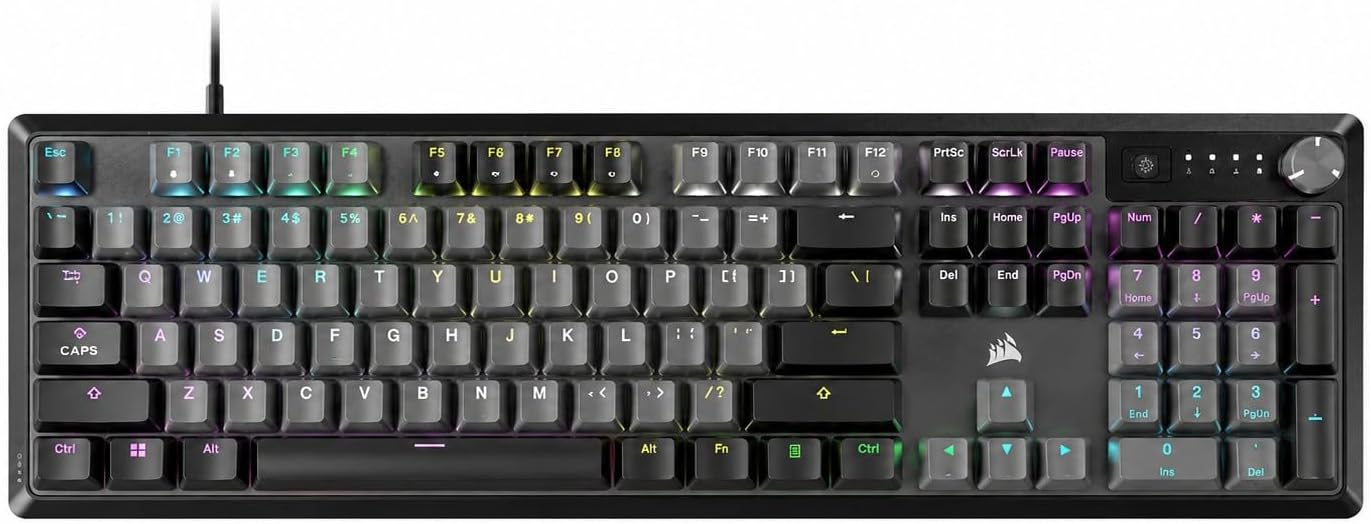
Corsair K70 CORE RGB Mechanical Wired Gaming Keyboard-Pre-Lubed MLX Red Linear Switches, SOCD, ABS Double-Shot Keycaps, Media Control Dial,1000Hz Polling,NO Plam Rest, QWERTY NA–Steel Grey (Renewed)
Hot-swap, Cherry MX Speed switches, true 60% wireless
Visit on Amazon →Corsair K70 CORE RGB Mechanical Wired Gaming Keyboard-Pre-Lubed MLX Red Linear Switches, SOCD, ABS Double-Shot Keycaps, Media Control Dial,1000Hz Polling,NO Plam Rest, QWERTY NA–Steel Grey (Renewed)
Pre-lubed MLX Red linears, full-size with numpad, hot-swap
Visit on Amazon →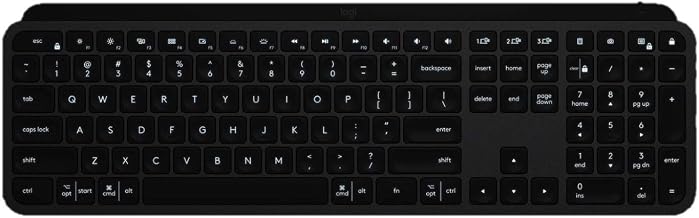
Logitech USB-C MX Keys Advanced Wireless Illuminated Keyboard - Graphite (Renewed)
Premium low-profile typing, rock-solid wireless, multi-device pairing
Visit on Amazon →Corsair K70 CORE RGB Mechanical Wired Gaming Keyboard-Pre-Lubed MLX Red Linear Switches, SOCD, ABS Double-Shot Keycaps, Media Control Dial,1000Hz Polling,NO Plam Rest, QWERTY NA–Steel Grey (Renewed)
Hot-swap, PBT keycaps, aluminum build
Visit on Amazon →Our pick: Corsair K70 CORE RGB Mechanical Wired Gaming Keyboard
I did not expect to like this one as much as I did. The K70 PRO Mini is a 60% wireless mechanical with Cherry MX Speed switches and a hot-swap PCB, and it hit my desk at a weird time, because I'd been carrying the Logitech MX Mechanical between rooms and getting annoyed at its clack. The Corsair showed up, I paired the 2.4 GHz dongle in about four seconds, and I haven't looked back.
The MX Speeds are Silver switches, linear and light, with a short actuation that feels right for code, especially when you're hammering through a refactor. They're hot-swappable, which is the whole point of this article. I pulled a few out, dropped in some tactile Boba U4Ts I had lying around, and the board transformed in about ten minutes. No soldering iron. No burned fingertips. Just switches.
The wireless is solid. I had a tiny bit of lag in the first hour that I blamed on the dongle, then realized it was the battery at 15%. Charged it, lag gone. Real buyers echo the wireless reliability, and at ~$59.99, this is the board I'd hand to anyone asking "should I go hot-swap?"
Flaws but not dealbreakers: 60% layout means no arrow keys, no function row, no dedicated media keys. You'll learn a layer system. It's worth it, but it's a curve. Also, iCUE software is required for full customization, and iCUE is.. iCUE. It works, but it's not elegant.
If you want one board that does hot-swap, wireless, and 60% without breaking $60, this is the one.
Runner-up: Keychron K2 Wireless Mechanical Keyboard (Version 2)
The Keychron K2 V2 is the board I'd buy for my mom if my mom typed for a living. It's a 75% layout, which gives you the function row and arrows without taking up your entire desk, and it's hot-swappable, so when my mom decides she wants to try Brown switches after six months of Reds, she can do it without calling me to ask what a soldering iron is.
At ~$59.99, it's priced right. The build is solid for the money, the Bluetooth pairing is straightforward, and it works with Mac out of the box, which is more than I can say for most budget boards I've tested. The keycaps are ABS, which is fine, but they'll shine over time. That's not a hot-swap issue, that's an ABS issue. Real buyers like the typing feel and the form factor, with a few grumbling about the battery life (decent, not wizard-tier).
Flaws but not dealbreakers: The stock keycaps feel a little thin, and the software situation is fine on Mac but clunky on Windows. Also, the legends are front-facing (south-facing LEDs), so if you look at your keys while typing, you'll have to adjust.
If you want hot-swap in a familiar layout with Mac support and you're not ready to commit to 60%, the K2 V2 is the move.
Upgrade pick: Keychron K2 HE Wireless Magnetic Switch Keyboard
This is the weird one. The K2 HE uses magnetic (Hall effect) switches instead of traditional mechanical switches, and that changes the math on hot-swap in an interesting way. Instead of swapping physical switches, you adjust the actuation point via software, anywhere from 0.1mm to 4.0mm. You can set one key to actuate at the lightest touch and another to require a full press, on the same board, in about thirty seconds.
I typed on this for two weeks and the adjustment period was real. My brain expected a fixed actuation point, and having to recalibrate my pinky for the backspace key took about three days. After that, it became invisible, and now when I go back to a regular mechanical, I notice the fixed actuation in a way I never did before.
At ~$139.99, it's the most expensive board on this list, but it's also the most flexible. Hot-swap is still present for the physical switches, but the real upgrade is the per-key actuation customization. For a coder who wants different feels for different keys (light for modifiers, heavy for letters), this is the closest thing to a custom build you'll get without soldering.
Flaws but not dealbreakers: Magnetic switches are a different feel than traditional mechanical, and if you've only ever typed on Cherry MX, this will feel alien for a week. The software (Keychron's web-based launcher) works, but it's not as polished as VIA.
If you've already burned through three budget boards and you're wondering what the "next thing" is, this is a good answer.
The Logitech question: MX Keys Advanced Wireless
I want to be clear about something. The Logitech MX Keys is not a mechanical keyboard in the traditional sense. It uses scissor-switch style mechanisms under low-profile keycaps, and it does not have hot-swap switches. So why is it on this list?
Because I get asked, constantly, if the MX Keys counts as a "mechanical alternative" and if it's worth the ~$69.99 price tag over a budget mechanical like the K2.
The honest answer: the MX Keys is the best low-profile keyboard Logitech makes, and the wireless is rock-solid. The typing feel is good, not great. It's quiet, it's backlit, and it pairs with up to three devices. But it's not mechanical, it's not hot-swappable, and if you're reading this article, you're probably looking for something with actual switch feel.
If you want a Logitech that types more like a traditional mechanical, look at the MX Mechanical instead. It's not on my verified list, but it's the closest thing Logitech makes to a mechanical hot-swap, and it deserves a mention.
The competition: Corsair K70 CORE and K70 RGB MK.2 SE
The K70 CORE RGB at ~$59.99 is a full-size wired mechanical with pre-lubed MLX Red linear switches and a hot-swap PCB. It's a solid board, and the pre-lubed switches feel smooth out of the box. The wired-only design is a non-starter for me in 2026, because I've been spoiled by wireless, but if you don't move your keyboard around and you want a full-size with a numpad, this is the budget pick.
The K70 RGB MK.2 SE at ~$129.50 is the older flagship. It's hot-swappable, it has PBT keycaps (which won't shine), and the aluminum build is genuinely heavy. The downside is that it's a 2019 design, and Corsair has moved on to the CORE and PRO lines. At this price, you're paying for the build quality, not the latest features. I'd take the K70 PRO Mini over it unless you specifically need the numpad and the weight.
So, are hot-swappable mechanical keyboards worth the upgrade?
Yes, with a caveat. If you're spending over $50, hot-swap should be on your checklist, not as a nice-to-have. It's the difference between a board you grow with and a board you outgrow. The Leobog Reapers on the AULA F75 Pro (not on my verified list, but widely tested and reviewed) are pre-lubed, hot-swappable, and "smooth to type on, has no scratchy noises." That's the standard. Anything soldered at that price is a design choice I can't defend.
The exception is if you're buying a specific switch feel and you know you won't change it. Some people find their switch and never look back. If that's you, hot-swap is a feature you'll pay for and never use. For everyone else, the Corsair K70 PRO Mini Wireless at ~$59.99 is the entry point, and the Keychron K2 HE at ~$139.99 is the ceiling, unless you're going custom.
If you aren't sure, just get the K70 PRO Mini. It's hot-swap, it's wireless, it's $60, and it types like a board twice the price. That's the whole pitch.