Shopping for a keyboard in 2026 is not a shortage problem. It is a matching problem. There are compact wireless boards, aluminum enthusiast decks, hall-effect gaming keyboards, and loose switch packs all sitting in the same price conversation, and the descriptions rarely tell you which one belongs on your desk. This guide narrows the field to six products and explains what actually separates them: layout, switch type, connectivity, case material, and whether the board lets you change switches without a soldering iron.
The short version is that the best mechanical keyboards here split into two jobs. One group is built for people who type all day and want a board they can modify later. The other group is built for specific platform needs, gaming responsiveness, or budget replacement. Read the quick answer first, then the comparison section, then decide.
Related: Hot-Swap Keyboards Explained: Sockets, Switches, and What Fits
Quick answer
The AULA F75 75% Wireless Mechanical Keyboard is the strongest fit for a first serious board because it combines a compact 75% layout, hot-swap sockets, pre-lubed Reaper switches, RGB backlighting, and three connection options (2.4GHz, Type-C, and Bluetooth 5.0) in one package. Choose the KEEBMONKEY WOBKEY Crush 80 Reboot instead when a CNC aluminum case and a quick-release design matter more to you than price.
Mechanical keyboards and switches worth comparing
The six products below cover the range a keyboard shopper actually faces: a budget-friendly wireless compact, an aluminum enthusiast board, a tenkeyless gaming keyboard, two loose switch packs for people who already own a board, and a full-size budget deck for general desktop use.
Two things are worth flagging before the grid. First, hot-swap support is the single feature that decides whether a board can grow with you, since it is the difference between swapping a switch in seconds and breaking out a soldering iron. Second, switches sold separately only make sense if your board supports the pin count and mounting style they use. The cards below reflect the supplied product details, not assumptions.
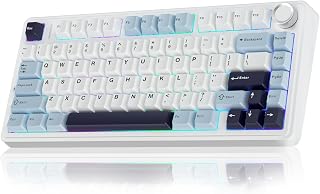
AULA F75 75% Wireless Mechanical Keyboard, Hot Swappable Creamy Keyboard, Pre-lubed Reaper Switches, 2.4GHz/Type-C/BT5.0, RGB Backlit Gaming Keyboards(White & Blue)
A 75% layout board with hot-swap sockets, pre-lubed Reaper switches, RGB backlighting, and three connection modes: 2.4GHz wireless, Type-C, and Bluetooth 5.0. The White and Blue colorway keeps a compact footprint on the desk.
Visit on Amazon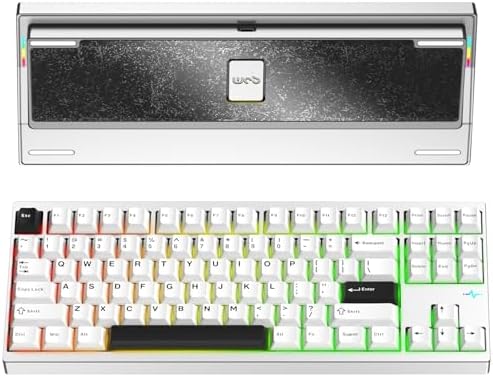
KEEBMONKEY WOBKEY Crush 80 Reboot CNC Aluminum 5-Second Quick-Release Triple-Mode Connectivity Mechanical Keyboard with Superior Acoustics (Pro Silver)
Check current Amazon price
A CNC aluminum board with a 5-second quick-release design and triple-mode connectivity, positioned around acoustic tuning. Pro Silver finish, aimed at buyers who want a heavier, more rigid case.
Visit on Amazon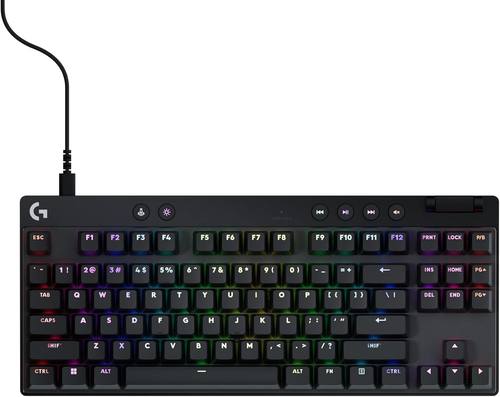
Logitech G PRO X TKL Rapid Tenkeyless Gaming Keyboard (Hall-Effect) - Black
A tenkeyless gaming keyboard built on hall-effect switches rather than fixed mechanical contacts, in a black finish. The TKL layout drops the number pad, which frees desk space for mouse movement.
Visit on Amazon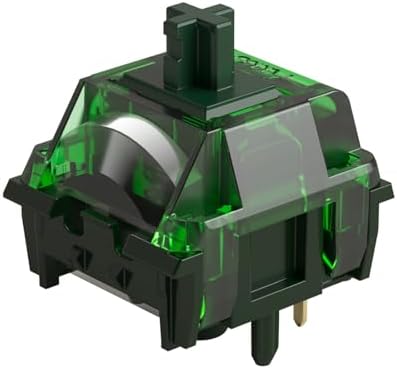
MONSGEEK Heavy Linear Switches Mechanical Gaming Keyboard Switch 5-Pin Green Fog Switch with LED Diffuser Pre-Lubed 60gf
A pack of 5-pin linear switches with pre-lubed 60gf springs and an LED diffuser, in the Green Fog colorway. These are switches only, so they require a board with compatible hot-swap sockets or solder points.
Visit on Amazon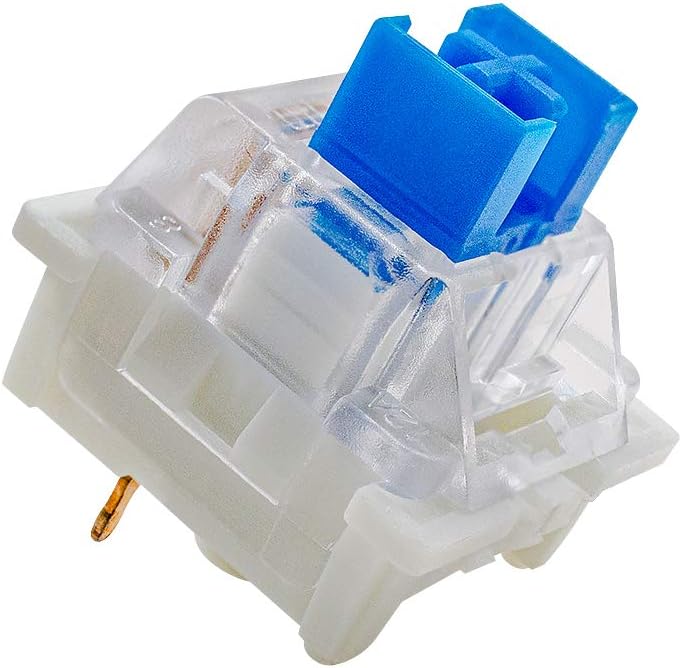
outemu Blue Switches 20 Pack, 3 Pin/Clicky Tactile 50gf/Dustproof/RGB Key Switches - Cherry MX Equivalent - DIY Replaceable for Mechanical Keyboard
A 20-pack of clicky tactile switches with a 50gf rating, 3-pin plate mounting, and dustproof stems. Listed as a Cherry MX equivalent and intended for DIY replacement in compatible mechanical keyboards.
Visit on Amazon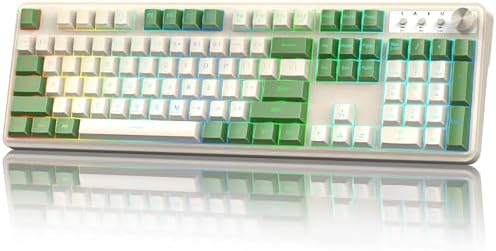
Redragon K521 Upgrade Rainbow LED Gaming Keyboard, 104 Keys Wired Mechanical Feeling Keyboard with Multimedia Keys, One-Touch Backlit, Anti-Ghosting, Compatible with PC, Mac, PS4/5, Xbox
A 104-key wired keyboard with rainbow LED backlighting, multimedia keys, one-touch backlit control, and anti-ghosting, listed as compatible with PC, Mac, PS4/5, and Xbox. Sold as a mechanical-feeling deck rather than a hot-swap mechanical board.
Visit on AmazonPrices and availability may change. Check the retailer for current details.
How these products were compared
This guide compares layout and form factor, switch type and actuation weight, connectivity and hot-swap support, case material and construction, and platform compatibility plus maintenance needs.
The distinctions below come from the listed product details for each item rather than from hands-on lab testing, and no current prices are printed here. Use the retailer link on each card to confirm price and availability. Product names, images, and retailer links are matched to their product codes so that every card points to the product shown.
One practical note on that last point: switch packs and keyboards are not interchangeable, and they should not be compared as if they were. A board is a complete input device. A switch pack is a consumable upgrade path, and it only earns its place on your desk if your board already supports the pin count and mounting style.
How to choose the right mechanical keyboard
Start with layout, because it is the decision you cannot undo. A 75% board like the AULA F75 keeps the arrow keys and function row while cutting the number pad, which is why it is such a common choice for people who type on a laptop most of the day. A tenkeyless board like the Logitech G PRO X TKL Rapid also drops the number pad but keeps a wider, more spaced-out key arrangement. The 104-key Redragon K521 keeps everything, which matters if you enter numbers constantly and do not want a separate pad taking up desk space.
Then decide whether hot-swap support matters to you, and be honest about it. If you like the idea of changing your switch feel in a year without buying a new board, hot-swap is the feature that decides whether that is a five-minute job or a project. A board that accepts 3-pin and 5-pin switches gives you the widest range of aftermarket options, which is exactly where packs like the MONSGEEK Heavy Linear set and the outemu Blue set come in. If you would rather never think about switches again, a board with fixed switches and a feel you already like is the simpler purchase.
Sound and feel deserve their own consideration, because they are what you actually live with. Pre-lubed switches tend to sound more consistent out of the box than dry ones, which is the appeal of the AULA F75's pre-lubed Reaper switches and the pre-lubed MONSGEEK linear set. Stabilizers are the other half of the equation. Rattle from a poorly tuned stabilizer is the fastest way to make an expensive board feel cheap, and it is usually fixable with lube and a patient afternoon rather than a return.
Finally, match connectivity to your setup instead of the other way around. Triple-mode boards cover wireless dongle, wired Type-C, and Bluetooth in one device, which is useful if you move between a desktop and a laptop. A wired-only board is simpler and removes charging from your routine entirely. There is no universal winner here, only the option that fits how your desk is actually wired. If you want more detail on sockets and switch compatibility before you commit, our guide to hot-swap keyboards covers the fitting questions.
AULA F75 75% Wireless Mechanical Keyboard
The AULA F75 earns the top spot because it puts the features that matter most into one affordable package. It is hot-swappable, so the switches are not a lifelong commitment. Its Reaper switches come pre-lubed. It offers 2.4GHz, Type-C, and Bluetooth 5.0 connectivity, so it can serve a desktop, a laptop, and a tablet without cable swapping. It is also RGB backlit, which matters more for visibility in a dim room than for looks.
The trade-off is that a 75% board is a compromise by design. You lose the dedicated number pad, and compact layouts squeeze the arrow cluster closer to the main typing block, which some people never adjust to. The AULA F75 is also a plastic-bodied board rather than an aluminum one, so it will not have the same heft or acoustic character as a CNC case. If either of those is a dealbreaker, the next section is for you.
Alternatives to consider
The KEEBMONKEY WOBKEY Crush 80 Reboot is better suited to buyers who want a heavier, denser board with a CNC aluminum case and a 5-second quick-release design for easy access to the internals. Its triple-mode connectivity keeps it flexible, and it is positioned around acoustic tuning. If your priority is the sound and the case rather than the lowest possible cost, this is the direction to look.
The Logitech G PRO X TKL Rapid is a stronger fit when gaming responsiveness is the point. It uses hall-effect switches with a tenkeyless layout, which frees up desk space for mouse movement and suits players who want a competitive-focused deck rather than a modding platform.
The MONSGEEK Heavy Linear Switches and the outemu Blue Switches 20 Pack cover the DIY side of the list. The MONSGEEK set is the linear option, with 5-pin mounting, pre-lubed 60gf springs, and an LED diffuser. The outemu set is the clicky tactile option, with a 50gf rating, 3-pin mounting, dustproof stems, and a 20-switch count. Choose linear if you want a smooth, consistent press, and clicky tactile if you want audible feedback and a bump at the actuation point.
The Redragon K521 covers the budget full-size case: 104 keys, multimedia keys, one-touch backlight control, anti-ghosting, and compatibility listed for PC, Mac, PS4/5, and Xbox. It is the one deck here described as mechanical-feeling rather than hot-swap mechanical, so treat it as a general-purpose desktop keyboard rather than a hobbyist platform.
Day-to-day use and maintenance
Daily ownership is mostly about small habits. If you buy a hot-swap board, keep the switch puller somewhere you can find it, because the whole point is that you can change your mind about feel later without buying a new keyboard. When you swap switches, do it with the board unplugged and seated flat on a stable surface, and press each switch in firmly enough that it seats fully in the socket.
Keycaps and the plate collect dust and skin oil, which is what makes a board feel grimy long before anything actually wears out. A soft brush and a slightly damp cloth handle most of it, and keycaps on a standard profile can usually be pulled and washed separately. Check your board's instructions before you submerge anything, because not every keycap set tolerates it.
Connectivity has its own maintenance load. A wireless board needs charging, so it is worth deciding early whether you will run it on 2.4GHz, Bluetooth, or cable, and where the charging cable lives. If you share a room or an office, remember that clicky switches like the outemu Blue set are noticeably louder than linear ones, and the sound carries. And if you eventually lube stabilizers or switches, work in small amounts on a protected surface, because more is not better and too much lube dulls the feel.
Buying checklist
- Measure your desk space and decide whether you can live without a number pad.
- Choose your switch type, linear, tactile, or clicky, based on normal daily use rather than an occasional edge case.
- Confirm that the exact model you are buying includes hot-swap sockets if you want to change switches later.
- If you are buying loose switches, verify that your board supports their pin count and mounting style.
- Read the cleaning, charging, and maintenance instructions for the specific board.
- Verify the current retailer price, availability, and return terms before ordering.
Final recommendation
Choose the AULA F75 75% Wireless Mechanical Keyboard when you want one board that covers typing, wireless flexibility, and future switch swaps without a large outlay. Choose the KEEBMONKEY WOBKEY Crush 80 Reboot when the case material and acoustic character are worth more to you than saving money, or the Logitech G PRO X TKL Rapid when a tenkeyless hall-effect gaming keyboard is the actual requirement. Buy the MONSGEEK Heavy Linear Switches or the outemu Blue Switches 20 Pack only if you already own a compatible board and want to change its feel, and pick the Redragon K521 if you simply need a full-size wired keyboard for general desktop use at a low cost.