Related: Best Mechanical Keyboard for Coding Under $100
I write code for eight hours a day on whatever board happens to be on my desk, I have built 14 customs, and I own more sets of switches than is reasonable. That history gives me one firm opinion: hot-swap is non-negotiable in 2026. The first question I ask about any budget hot-swap mechanical keyboard is not how it looks in a product photo, it is whether I can pull the switches out in three weeks when I get bored of them. If the answer is no, the board had better be cheap.
The four boards here cover the range a real desk actually needs. One is full-size and wired, one is a 108-key hot-swap with extra hotkeys, one is a tri-mode board that talks to a laptop and a console, and one is a 75% wireless board for people who never touch a numpad. Three of the four are hot-swappable. The fourth is not, and I will tell you exactly where it fits.
Here is the part most buying advice skips. On a budget board, the money gets saved in the stabilizers and the keycaps, not the case. Rattly stabilizers are the difference between a cheap board and a good one, and nearly every budget board rattles until someone lubes it. Keep that in mind as you read, because it is the first thing I check and the first thing you should.
Best Overall: AULA F99 Wireless Mechanical Keyboard
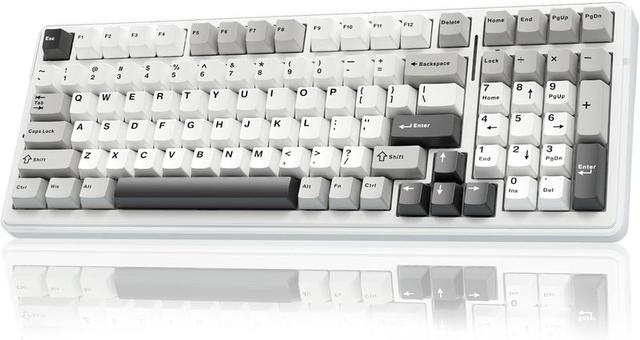
If I had to hand one board to someone who wanted a single keyboard for a laptop, a desktop, and a console, it would be this one. The F99 is tri-mode: Bluetooth 5.0, 2.4GHz, and USB-C, so it moves between machines without a dongle swap. It is hot-swappable, and it ships with pre-lubed linear switches.
Pre-lubed is not marketing fluff. Factory lube is the tedious part of this hobby done for you, and it is the reason a board sounds smoother out of the box instead of dry and scratchy. Linear switches have no bump and no click, which is what I recommend to anyone who types all day, mostly because a shared office will not hate you for it.
The tradeoff is footprint. This is a bigger board than a 75%, so if your desk is small, skip ahead to the Kisnt. And wireless means a battery, which means one more thing to charge. I test battery life the way I test switches, and a wireless board is only as good as its worst week.
Best Full-Size Wired: Redragon K668
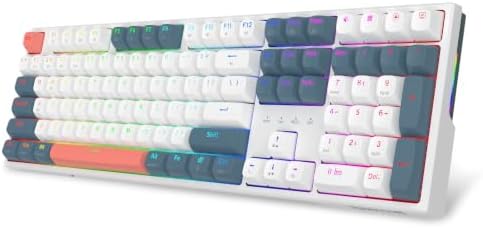
A 108-key layout is a full-size board plus four extra hotkeys, which is the kind of thing you stop noticing until you go back to a board without them. The K668 is hot-swappable, wired, and RGB backlit.
Wired is a feature, not a compromise. There is no battery to charge, no dongle to lose, and no pairing dance when you sit down. The cost is a cable across the desk, and if that bothers you, the AULA or the Kisnt will do the same job without the wire.
The 108 keys matter if you live in a spreadsheet. A numpad is not nostalgia, it is the difference between typing numbers and hunting for them. And because the switches are hot-swap, this board is not a permanent decision. Use whatever switches it ships with, and if you later want something heavier or quieter, you swap them instead of buying a new keyboard.
One thing to check before you commit: whether you need the manufacturer's software for RGB control. My rule is simple. If changing the lighting requires an account, the lighting stays on the default.
Best Compact Wireless: Kisnt KN85
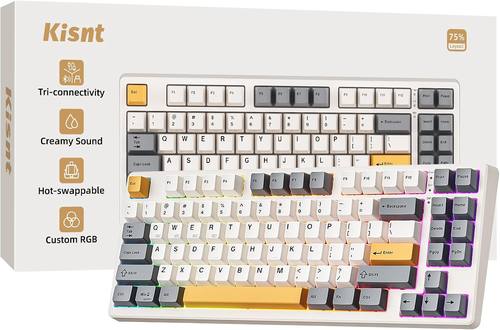
The KN85 is a 75% board, which means you get the arrow keys and the function row and you lose the numpad. That is the layout I recommend to anyone who does not do data entry, because it keeps your mouse closer to your right hand, and your shoulder notices that long before your fingers do.
It is wireless over Bluetooth, 2.4GHz, and USB-C, and it is hot-swappable with linear switches. The creamy sound claim in the listing is marketing language, but the intent behind it is real. A compact board with linear switches in a retro beige case is built for people who type, not for people who want a light show.
If your desk is tight and you rarely touch a numpad, this is the shape to buy. If you bounce between a Mac and a Windows machine, the multi-connection wireless is the reason to pay for it.
Best Budget Wired Pick: RisoPhy
This is the odd one out, and I want to be straight about that. The RisoPhy is a 104-key wired board with blue switches, ABS keycaps, anti-ghosting, and a spill-resistant build. The listing does not mention hot-swap, so treat it as a soldered board. The switches you get are the switches you keep.
Blue switches are clicky. They make noise on purpose, they have a bump you can feel, and they are the reason some people fall in love with mechanical keyboards and the reason some offices ban them. If you share a room, think hard about this one.
What earns it a spot is the price bracket and the spill resistance. A budget full-size board that shrugs off a coffee incident has a place on a desk where drinks live. Just know what you are buying: a loud, wired, full-size board that will not be modified later.
How I test every board
Every board I write about gets the same treatment. Two weeks of daily typing on real code, not a typing test. A stabilizer rattle test, which means tapping the spacebar, backspace, shift, and enter and listening for the metallic ping that tells you where the manufacturer saved money. A blind switch comparison, because switch feel is personal and I want to know what my hands say before I read the spec sheet. And a full work week, because a board that is fun for an hour can be miserable by Thursday.
On any budget board, the stabilizers are the first thing to check. Rattle is not a defect you have to live with. It is usually a lube problem, and lubing stabilizers is the cheapest fix in this hobby. If the sound is hollow, a tape mod helps. There is a fix for almost everything, which is exactly why hot-swap matters so much at this price.
What the specs actually tell you
Layout
Full-size (104 or 108 keys) gets you a numpad and costs you mouse room. A 75% keeps the arrows and the function row and drops the numpad. Neither is better, they are different desks. Count how often you actually type numbers in a column before you decide.
Switches
Clicky blue switches are loud and tactile. Linear switches are smooth with no bump, and pre-lubed linears are the easiest first switch to live with. Tactile is the middle ground. The only wrong answer is picking a switch because a review called it the best one.
Connection
Wired means no charging, ever, and one more cable. Wireless tri-mode means one board for a laptop, a desktop, and a console, at the cost of a battery. If you have ever had a keyboard die mid-sentence, you already know which side of that trade you are on.
Hot-swap and keycaps
Hot-swap is non-negotiable for me. It turns a keyboard into a platform instead of a purchase. And keycap quality tells you more about a board than the case material does. Expect ABS caps at this price to shine where your fingers rest. That is normal, not a defect.
The comparison table
| Product | Keys | Switches | Connection | Hot-swap | Price |
|---|---|---|---|---|---|
 Visit on Amazon → Visit on Amazon →AULA F99 |
See listing | Pre-lubed linear | BT 5.0 / 2.4GHz / USB-C | Yes | $68.99 |
 Visit on Amazon → Visit on Amazon →Redragon K668 |
108 | See listing | Wired | Yes | $39.99 |
 Visit on Amazon → Visit on Amazon →Kisnt KN85 |
75% layout | Linear | Bluetooth / 2.4GHz / USB-C | Yes | $49.99 |
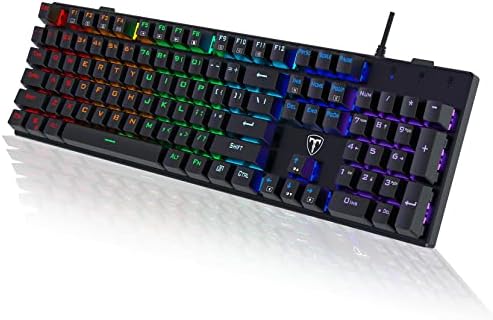 Visit on Amazon → Visit on Amazon →RisoPhy |
104 | Blue, clicky | Wired | Not listed | $28.99 |
The table tells you most of what you need. Three boards let you change the switches. One does not. Two run on a cable. Two run on a battery. Pick the column that matters most to you and the decision gets short.
Should you buy the AULA F99?
Yes, if you want one board for everything. Tri-mode wireless covers a laptop, a desktop, and a console, the switches are pre-lubed linears, and it is hot-swappable. The thing to know going in is that it is a larger board than a 75%, and wireless means charging. If neither of those is a dealbreaker, this is the pick I would start with.
Should you buy the Redragon K668?
Yes, if you need a numpad and you want the option to change switches later. Wired means no battery and no dongle, and the extra four hotkeys earn their space once you use them. Check the software situation before you buy if RGB control matters to you. Otherwise this is the most traditional board of the four, in the good sense.
Should you buy the Kisnt KN85?
Yes, if your desk is small. A 75% layout keeps the arrows and function row, drops the numpad, and gives your mouse room back. Hot-swap and linear switches mean it is a platform, not a purchase. If you type more than you game and you like the retro beige look, this is the one that will feel least like a compromise.
Should you buy the RisoPhy?
Only on the right terms. You want clicky blue switches, you want a full-size wired board, and you are fine never modifying it. The spill-resistant build is a genuine plus, and the price bracket is the reason it is here. If any part of you wants to try different switches later, spend a little more and buy a hot-swap board instead.
The bottom line
If hot-swap matters to you, pick between the AULA F99, the Redragon K668, and the Kisnt KN85 based on layout and whether you want a cable. If you want loud clicky switches and the lowest entry point, the RisoPhy is the exception on this list, and it is honest about what it is. Whichever you choose, tap the spacebar first thing and listen. That sound tells you more than the spec sheet ever will.