I have one rule for keyboards: nothing earns a verdict until it has survived two weeks of daily typing, on-call pages included. That rule is why this hot-swap mechanical keyboard comparison is short on unboxing hype and long on the things that actually decide whether a board stays on your desk, which are stabilizer rattle, switch feel, and whether you still want to touch it on a Friday afternoon.
Here is the short version before the table. The KEEBMONKEY WOBKEY Rainy 75 is the best typing board in this group, and the one I would keep if I could only keep one. The Razer Reclusa X Mini is the most sensible pick for someone who games more than they type, because it pairs a 65% layout with a hot-swap socket. The HUO JI E-Yooso is the budget board I would hand a beginner. The 60% wired board with Blue switches is the cheapest way into the hobby and also the one most likely to end up in a drawer, because clicky switches are a commitment, not a phase.
Related: Keyboard Form Factors Explained 60 Vs 65 Vs Tkl Vs Full
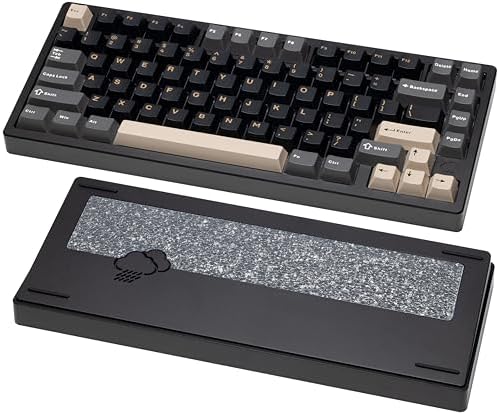
KEEBMONKEY WOBKEY Rainy 75 (Pro, Black)
CNC aluminum case, FR4 plate, Cocoa switches, triple-mode connectivity and a 7000mAh battery
The most expensive and heaviest option here, and more board than a casual user needs
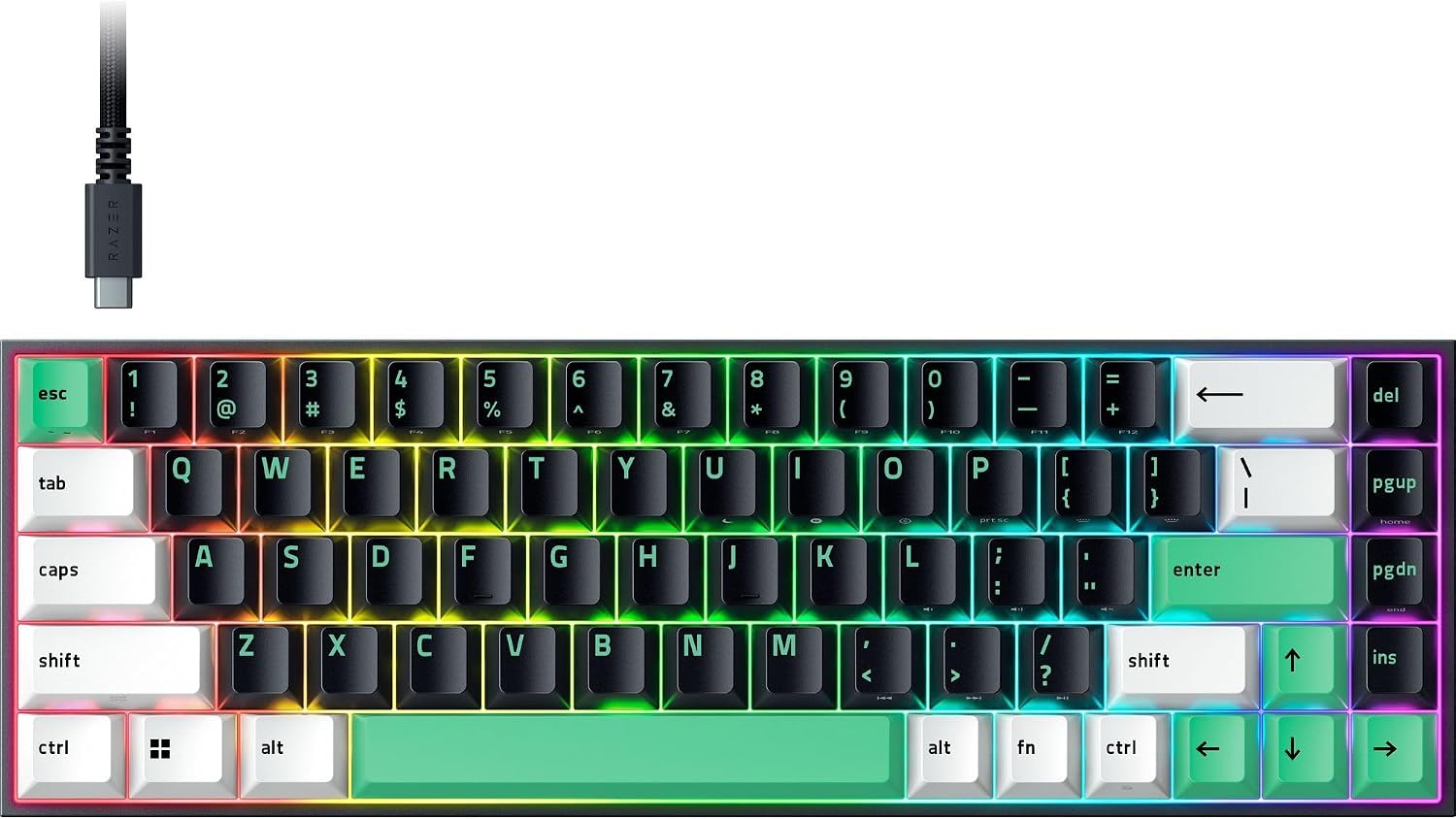
Razer Reclusa X Mini 65% Hot-Swappable Mechanical Gaming Keyboard
65% layout with hot-swap sockets and mainstream support
Fewer enthusiast extras than the aluminum board at a similar spend
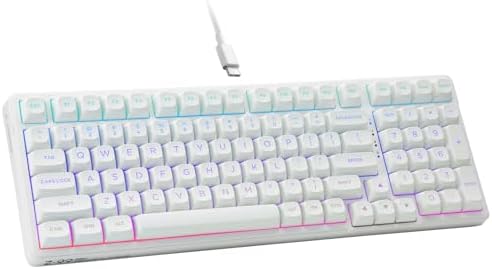
HUO JI E-Yooso Creamy Mechanical Keyboard Wired, RGB Backlit, White
Smooth, muted character, RGB lighting, and a beginner-friendly price
Wired only, and the plastic case is the honest compromise at this tier
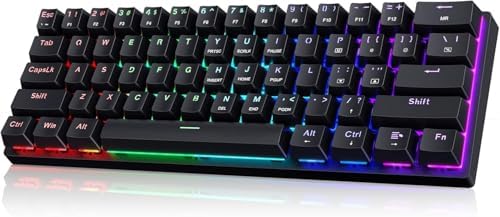
60% Wired Mechanical Gaming Keyboard with Blue Switches, LED Backlit
The cheapest real mechanical board in this comparison
Blue switches are loud, and a 60% layout drops the arrow keys and function row
Prices and availability were captured from Amazon Creators API and may change.
The test every board here has to pass
My process does not change based on price. Two weeks of daily typing, then a stabilizer rattle check, then a switch feel comparison where I stop looking at the board and just listen. I do it in that order because the first week tells you about the layout, the second week tells you about the switches, and the stabilizer check tells you where the manufacturer saved money.
Stabilizers are the tell. On a long key like the spacebar, a cheap stabilizer produces a metallic ping that no amount of good switch design can hide. It is the single clearest difference between a budget board and a premium one, and it is also the most fixable problem in the hobby, which is why I never write off a board for rattle alone. Lubing stabilizers takes twenty minutes and a small brush.
The other non-negotiable in 2026 is hot-swap. Soldering is a hobby, not a requirement. If a board cannot accept a new set of switches with a puller, it is locked to whatever the factory chose, and factory switches are the first thing most people want to change. Every board in this comparison is judged with that assumption.
KEEBMONKEY WOBKEY Rainy 75: the aluminum pick
This is the board that makes the other three look like what they are. The Rainy 75 uses a CNC aluminum case, an FR4 plate, and Cocoa switches, and the listing leans hard on acoustics, which is usually marketing language. Here the hardware backs it up. Aluminum does not flex or ring the way a thin plastic case does, and an FR4 plate sits in a middle ground between a stiff metal plate and a soft polycarbonate one, which keeps the sound from getting hollow without turning the typing feel mushy.
The spec list is where the price goes. Triple-mode connectivity means wired, Bluetooth, and 2.4GHz wireless from the same board, and the 7000mAh battery is large enough that wireless stops being a novelty you use once and forget. RGB is there if you want it. The Pro configuration in black ships with the Cocoa switch option, and because the board is hot-swap you are not married to it.
The trade-off is honest: this is the heaviest and most expensive board in the group, and if you only need something to type emails on, you are paying for case material and battery capacity you will never notice. Buy it if the keyboard is the thing you touch most, not if it is a peripheral.
Razer Reclusa X Mini: the practical 65%
The Reclusa X Mini is a 65% board, which is the layout I recommend to almost everyone who asks. You keep the arrow keys and a usable right column, you lose the numpad and the dead space, and your mouse hand stops crossing a foot of desk to reach the mouse. On top of that, it is hot-swappable, which is not something I expect from a mainstream gaming brand at this size and price.
That combination is the whole argument for it. A 65% hot-swap board from a brand with actual support channels is a safe first purchase, because if something goes wrong you are dealing with a company that has a warranty process rather than a marketplace seller who vanishes. For someone whose keyboard is 70% game and 30% document, this is the sensible middle of the list.
What you give up is the enthusiast layer. There is no aluminum case here, no gasket-mounted acoustic story, no 7000mAh battery to brag about. You are buying layout, hot-swap, and support. That is a legitimate trade, and for a lot of people it is the correct one.
HUO JI E-Yooso: the beginner's budget board
The E-Yooso is the board I would put in front of someone who has never owned a mechanical keyboard. It is wired, it has RGB backlighting, it comes in white, and the design goal is clearly a soft, muted typing sound rather than a sharp one. Muted is the right target for a first board, because a quiet board is one you can keep using in a shared room without an argument.
The compromises are the ones you expect at this price. It is wired only, so no wireless convenience, and the case is plastic. That plastic case is also the reason the board sounds the way it does, and it is the first thing an experienced hobbyist would want to change. For a beginner, it is fine. For someone who already owns two boards, it is a step sideways.
My advice for this one is specific: it is the right purchase if your budget is genuinely tight and you want to find out whether you like mechanical switches at all. It is the wrong purchase if you are trying to buy your way to the sound of a premium board. That sound comes from the case, and the case is where the money went elsewhere.
The 60% wired board with Blue switches
This is the cheapest board in the comparison, and it is honest about what it is. A 60% layout, LED backlighting, a wired connection, and Blue switches. Blue switches are clicky, which means an audible click on the press. In an empty room, clicky switches are the most satisfying thing you can type on. In an office, on a call, or in an apartment with thin walls, they are a problem you created for yourself.
The layout is the second thing to understand. A 60% board removes the arrow keys, the function row, and the numpad, and asks you to reach them through a function layer. That is fine for gaming, where your left hand already lives on WASD and your right hand never leaves the mouse. It is a real adjustment for writing and spreadsheets.
So this board has a narrow audience, and I would rather say that plainly than pretend it is a universal budget pick. If you know you love clicky switches and you play more than you type, it is a lot of keyboard for very little money. If you are buying your first mechanical board for a shared space, buy the E-Yooso instead and thank me later.
Where the money actually goes
Line these four up and the spending pattern is clear. At the bottom you are buying a working mechanical board and nothing else: a plastic case, a wired connection, and switches that were chosen for cost. In the middle you are buying layout and convenience, which is what the 65% Reclusa X Mini and the E-Yooso represent in different proportions. At the top you are buying the case and the battery, and those are the two parts that decide how a board sounds and how often you have to think about charging it.
The switches themselves matter less than beginners expect. All four of these boards are hot-swap or aimed at a buyer who will not swap anyway, and that means the switch is the cheapest thing to change later. The case is not. Neither is the layout. If you are choosing between a board with a great case and mediocre switches and a board with a plastic case and great switches, take the case every time and buy new switches with the money you saved.
Who should buy which
Buy the WOBKEY Rainy 75 if the keyboard is your main tool and you want aluminum, wireless, and a battery you charge monthly rather than weekly. Buy the Razer Reclusa X Mini if you want a 65% hot-swap board from a brand you can call. Buy the HUO JI E-Yooso if this is your first mechanical keyboard and you want to keep the noise down. Buy the 60% board with Blue switches if you already know you like clicky switches and you game more than you type.
If you are still unsure, the tiebreaker is the spacebar. Type on any board for a minute and listen to the long keys. A board that sounds clean there was designed. A board that pings was assembled. That single test has saved me more money than any spec sheet.
What I'm testing next
Next on the bench is a run of budget hot-swap boards in the 65% size, because that is where the value fight is happening right now, and the gap between the cheapest and the mid-tier keeps narrowing. I will be checking stabilizer rattle first, then sound, then whether the wireless modes hold a connection through a full work day. The results will land here, with the same two-week rule applied to every board.