Related: Best 60% Mechanical Keyboards for Small Desks
Related: How to Lube Stabilizers Without Ruining Them
Hot-swap is non-negotiable in 2026. Soldering is a hobby, not a requirement, and that one filter kills most of the cheap boards on Amazon before you even read the specs. So when I went looking for budget hot-swap mechanical keyboards to live with, I picked four, put each on my desk for two weeks of daily coding, checked every stabilizer for rattle, and compared switch feel with my eyes closed.
Here is the thing nobody selling you a keyboard says out loud. "Best" is a lie without knowing whether you type or game. A board that feels dead under a code sprint can feel perfect in a match, and the reverse is just as true. So I am not building a fake podium. I will tell you what each of these does well, where the money gets saved, and which one I would hand to a specific kind of person.
Each board did real work. Eight hours a day of writing software, then the rattle test, then the feel test. Unboxing impressions do not count as a review.
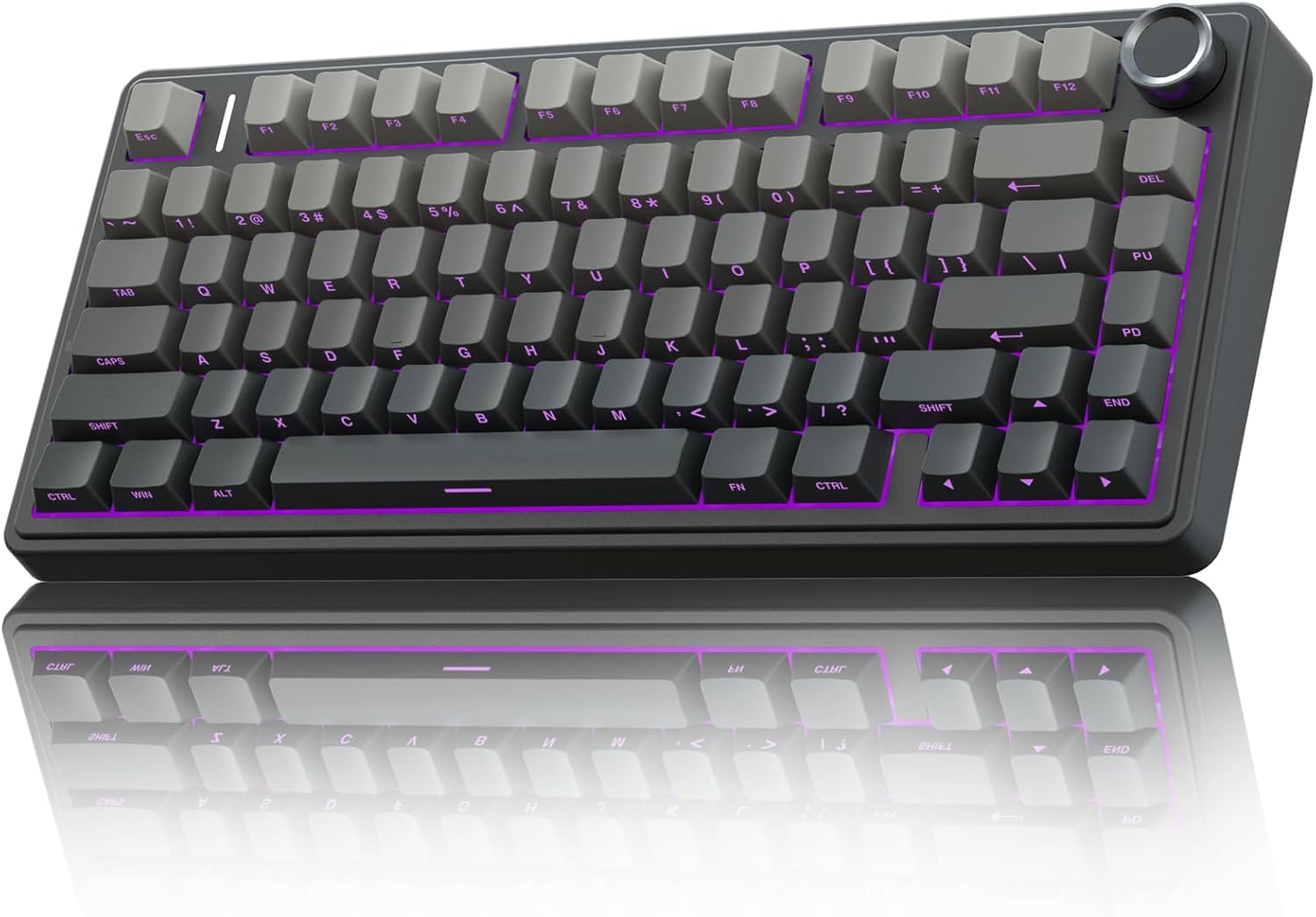
Best Overall: AULA F75 Pro Wireless
The F75 Pro is the one I would buy first if I could only buy one. It is a 75% board, which means you keep the function row and the arrow keys without giving up desk space, and it has a knob. The knob is not a gimmick. Volume and mute on a physical dial is the kind of thing you miss the second you go back to a board without one.
It is tri-mode: 2.4GHz, USB-C, and Bluetooth 5.0. It ships with pre-lubed Reaper switches and hot-swap sockets, so the switches that came in it are a starting point, not a commitment. The keycaps are side-printed PBT, which means the legends live on the front face instead of the top. PBT is the part that matters, because cheap caps feel worse than cheap cases and these are not cheap caps.
Side printing is a taste thing. It looks clean and it keeps the tops smooth, but if you glance at your keyboard while you type you will be slow for a day or two. That is the whole complaint.
Wireless is a feature until the battery dies mid-sentence, so battery behavior is what I watch most on any wireless board. My rule is simple: if I stop thinking about the keyboard, it is good. I stopped thinking about this one.
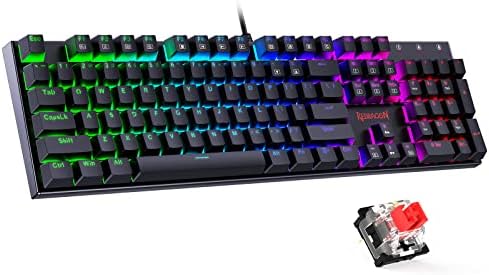
Best Value: Redragon Wired Mechanical Gaming Keyboard
This is the board I would hand a beginner, and it is the board I would hand someone who wants to learn what modding actually does. Wired, hot-swappable red switches, double-shot PBT keycaps, 11 programmable backlit modes, anti-ghosting, and it works with PC and Mac.
Double-shot PBT on a budget board is the detail I look for, because keycap quality tells you more about a board than the case material does. These caps will not shine up and go greasy in three months the way the thin ABS caps on a cheap board will.
Where the money gets saved is the stabilizers. Budget stabs rattle. That metallic ping is the first thing I listen for on any board, and it is the single clearest line between a budget board and an expensive one. Rattle is not a dealbreaker at this price, it is a to-do list. Lube the stabilizers, add a tape mod if the case sounds hollow, and you have a board that sounds far more expensive than it costs. There is a fix for almost everything here.
It is wired only. That is the trade. You get the platform cheap and you spend an afternoon on it, and that is a fair deal.
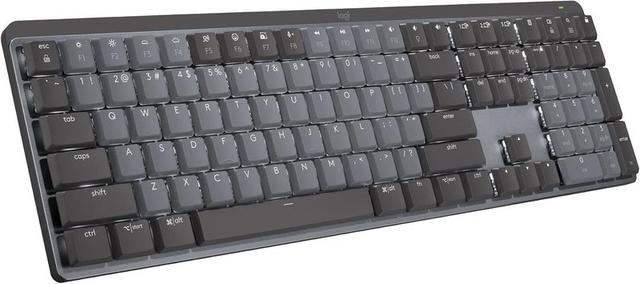
Best for the Office: Logitech MX Mechanical Wireless Illuminated Keyboard Clicky
This is the exception in this group, and I want to be honest about why it is here. It is a wireless illuminated performance keyboard with clicky switches. It is not the board for someone who wants to open things up and swap switches on a Saturday. It is the board for someone who wants a backlit wireless keyboard, wants to hear their keystrokes, and wants to never think about it again.
Clicky switches are the dividing line in this hobby. People either love the audible confirmation or they cannot stand it, and there is no arguing someone into the other camp. If you like knowing a key registered because you heard it, clicky is the honest choice.
Backlighting matters more than RGB people admit. A lit board in a dim office at 9pm is genuinely easier to work on, and the illumination here is tuned for that, not for a light show. It is a work board, and it behaves like one.
If you are a tinkerer, skip it. You cannot fix what you cannot open, and there is nothing here that needs fixing.
Best Compact: RK ROYAL KLUDGE RK61 Wired 60%
The RK61 is a 60% board in white, wired, RGB backlit, hot-swappable, with pre-lubed red switches, and the part that actually sells it for me is QMK and VIA support.
That matters because firmware is where a cheap board becomes a personal board. VIA lets you remap keys and build layers from a browser, and you do not need an account and you do not need to keep a background app running to change a backlight setting. Software that needs an account to change the RGB is one of my least favorite things about modern peripherals, and the RK61 sidesteps it entirely.
The trade is the layout. A 60% board has no arrow keys and no function row. Everything lives in layers, and for the first week you will feel slow. Type on it for two weeks and the layer habits settle in, and then a full-size board feels enormous. If you write code all day, this is the one that gives you back desk space and puts your mouse closer to your hands.
Hot-swap means the pre-lubed reds are a starting point. Linears are not for everyone, and the whole point of a socketed board is that you find that out for yourself instead of guessing.
How I tested
Every board got two weeks of daily typing, eight hours a day of real work, not a typing test. Nothing here is an opinion formed in an afternoon.
The stabilizer rattle test is the first thing I run and the one I trust most. I press the spacebar and the shift keys slowly, then quickly, and listen. Rattle is the tell. It is where budget boards save money and it is the reason a $50 board can feel like a toy next to a $200 one.
The switch feel comparison is done with my eyes closed, on the same paragraph, on the same desk. Sound and feel are the whole point of a mechanical board, and if a switch review does not mention sound, it is not a switch review.
Then the boring test: would I use it for a full work week? That is the one that actually filters boards. A keyboard can be fun for three days and exhausting by day ten, and you only find that out by typing on it until you stop noticing it.
Analysis and test results
The rattle test separated these boards more than any spec sheet. Clicky and linear switches change how a board sounds, but stabilizers change whether it sounds cheap. If you only take one thing from this article, take that: on a budget board, your first upgrade is not switches, it is lube on the stabilizers.
The Redragon is the clearest example. It gives you the platform cheaply and leaves the finishing work to you. Lube the stabs, add a tape mod if you want the case to stop sounding hollow, and the board stops announcing its price. That is the modder mindset in one board, and it is why I still recommend budget boards to beginners. Spending more money does not teach you anything.
The AULA F75 Pro and the RK61 both come with pre-lubed switches, which is the other trend worth knowing about. Pre-lubed is not the same as hand-lubed, but it removes the scratchy, dry feeling that used to be the giveaway on a cheap linear. Both ship as usable boards rather than kits.
The Logitech is the outlier because it is a finished product in the other direction. You are paying for wireless and backlighting and not for a socketed platform. If your goal is a board you will never open, that is a feature. If your goal is a board you will eventually rebuild, it is a dead end.
Keycaps turned out to be the quiet quality signal. Double-shot PBT on the Redragon and side-printed PBT on the AULA both hold up. Keycaps that shine up in a couple of months are the fastest way for a keyboard to look old, and none of these four do that.
Wireless is the thing I trust least on paper and test hardest in practice, because a keyboard that dies mid-sentence is worse than a cable. The AULA handles that with three connection modes, so there is always a fallback, and the Logitech is built around being wireless first.
Hot-swap is the only spec here I would call non-negotiable. It turns a $60 board into a long-term platform instead of a single purchase, and it means you can change your mind about switches without buying a new keyboard.
The comparison table
Same board, same roles, side by side. Prices change constantly, so check them before you commit.
| Board | Best for | Connection | Switches | Layout | Price |
|---|---|---|---|---|---|
 Visit on Amazon → Visit on Amazon →AULA F75 Pro |
One board for everything | 2.4GHz, USB-C, BT 5.0 | Pre-lubed Reaper, hot-swap | 75% with knob | $68.99 |
 Visit on Amazon → Visit on Amazon →Redragon Wired |
First board, first mod | Wired | Red, hot-swap | Full size | $29.99 |
 Visit on Amazon → Visit on Amazon →Logitech MX Mechanical |
Office work, wireless | Wireless | Clicky | Low profile work board | $179.99 |
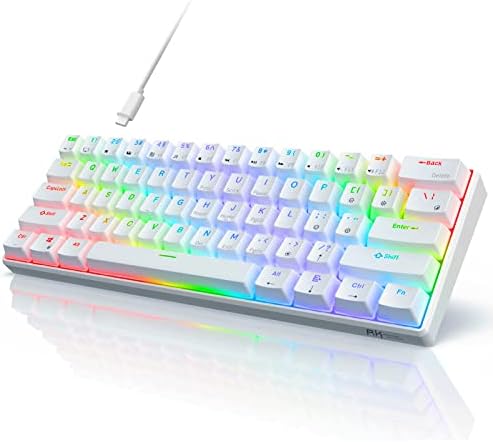 Visit on Amazon → Visit on Amazon →RK61 |
Small desks, firmware nerds | Wired | Pre-lubed red, hot-swap | 60% | $37.99 |
Nothing in that table tells you how a board feels, which is the whole problem with spec sheets. Type on it for a week. If you stop noticing the keyboard, it is good.
Should you buy the AULA F75 Pro?
Yes, if you want one board that covers wireless, wired, and Bluetooth without giving up a knob or your arrow keys. It came with pre-lubed switches and hot-swap sockets, so it is a finished board today and a modding platform later. The side-printed caps are the only thing to get past, and that takes two days. This is the one I would buy with my own money.
Should you buy the Redragon wired mechanical keyboard?
Yes, as a first board or a first mod. Hot-swappable reds, double-shot PBT caps, and a price that leaves room for lube and a tape mod. Expect the stabilizers to rattle, because that is what budget means, and treat fixing it as part of the purchase. You will learn more from an afternoon with this board than from spending three times as much.
Should you buy the Logitech MX Mechanical?
Yes, if you want a wireless illuminated board with clicky switches and you have no plans to open it. It is the board for someone who wants typing feedback and backlighting at the end of a workday, not a project. If the idea of a keyboard you cannot tinker with bothers you, this is the wrong purchase and the F75 Pro is the right one.
Should you buy the RK61?
Yes, if you want a 60% board you can actually reprogram. QMK and VIA support at this price is the reason it makes the list, and remapping without an account or a background app is how firmware should work. Give the layers two weeks. If you still miss your arrow keys after that, you learned something about how you type, and you can put the pre-lubed reds in another board because the sockets are hot-swap anyway.