Related: Linear vs Tactile Switches: How to Pick Your First Set
I have built 14 custom boards, I keep more than 30 sets of switches in a drawer, and the most expensive mistake I made in this hobby was buying a keyboard before I understood what I wanted it to feel like. Mechanical keyboard switches are the part you actually live with. The case is a container. The keycaps are a surface. The switches are the thing your fingers talk to for eight hours a day, and they are the one part you cannot evaluate from a product page.
The second most expensive mistake was buying a board I could not open. Hot-swap is non-negotiable in 2026. If a board does not let you pull a switch with a plastic tool and press a different one into the socket, you are locked into whatever the factory chose, and the factory chooses for the average person, not for you.
I run every board through the same test: two weeks of daily typing while I write code, a stabilizer rattle check on the shift, enter, and spacebar keys, and a blind switch comparison where I type on two boards with my eyes closed and see which one I stop noticing first. That last test is the real one. If you stop noticing the keyboard, it is good. If you keep noticing it, something is wrong, and it is usually the stabilizers or the switch weight.
This is a buying order, not a ranking. Switch feel is personal, and "best" is a lie until you know whether you type or game.
Buy switch samples before you buy anything else
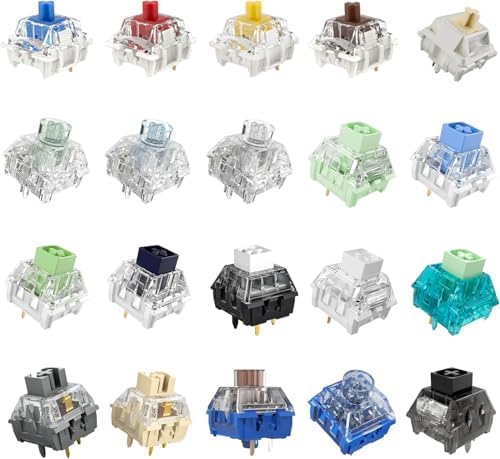
The Kailh Series Mechanical Keyboard Switches Sample Pack is the cheapest way to stop guessing. Twenty switches, one brand's spread of feels, in your hand for the price of a takeout lunch. You press each one with an index finger, then type a paragraph on the ones that do not bore you.
What you are listening for is not "which switch is best." It is three smaller questions. Does a linear switch feel smooth or scratchy under the finger? Does a tactile bump land where your finger expects it, or does it surprise you halfway down? Does a clicky switch sound satisfying on day one and unbearable on day four? A sample pack answers all three in an afternoon, and it costs less than the return shipping on a keyboard you guessed wrong about.
The catch is that twenty switches is a sample, not a set. You cannot fill a board with them. That is the point. Buy the sample pack, find the weight and the bump you like, then buy a full set of that switch. If you skip this step and buy a board first, you will end up buying switches anyway, except you will also own a board you are lukewarm about.
The cheap linear set worth trying on every board
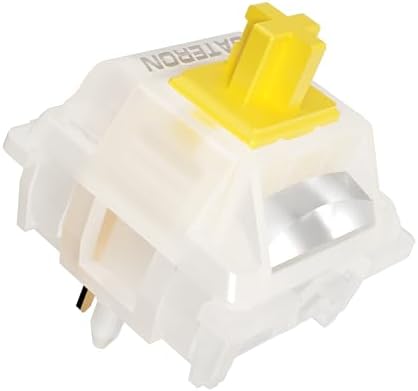
If the sample pack tells you that you want a smooth linear, the Gateron Milky Yellow Pro V2 set is where most people should land next. Ninety switches, one weight, one feel, enough to fill a board and have spares left over.
A mid-weight linear is the safest first set in the hobby because it does nothing dramatic. There is no bump to argue with, no click to annoy a roommate, just a straight press down and a spring pushing back. Milky Yellow Pro V2 is the set I suggest to people who say they want a keyboard that "just types," and it is also the set I suggest to people who game, because a linear does not fight a fast tap.
One arithmetic warning before you order: ninety switches covers a TKL, a 75 percent, a 65 percent, or a 60 percent board with room to spare. A full-size 104-key board needs 104 switches, so you are short. If your board is full-size, either buy two packs or leave your old switches in the number pad and put the new ones under the letters. Nobody types on the numpad anyway.
The board I would hand a friend: ASUS ROG Strix Scope II X
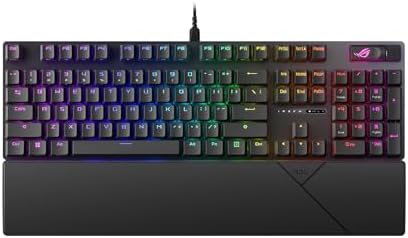
This is the one that checks the boxes I care about on a single full-size board. It is hot-swappable, so the Gateron set above can go straight in without a soldering iron. It ships with pre-lubed ROG NX Snow V2 linear switches, which means you get a factory-lubed linear feel out of the box rather than the dry, scratchy press a lot of gaming boards ship with. And the keycaps are PBT, which is the spec I check before anything else, because cheap ABS caps get shiny and slippery within a couple of months while PBT keeps its texture.
Full-size matters here. If you do spreadsheet work or you live in a code editor with a keypad-heavy workflow, a 100 percent layout saves you a separate number pad on the desk. The tradeoff is width: a full-size board eats desk space and pushes your mouse hand further out. That is the honest cost of the layout, and only you know whether your desk can pay it.
It is wired over USB, which some people will call a downside and I call a feature. No battery to die mid-sentence, no dongle to lose, no pairing mode to fight at 9 a.m. It supports both PC and Mac layouts, and the RGB is there if you want it and ignorable if you do not. If you wanted one board that does everything and you do not want to think about it again, this is the one I would hand you.
The pick for Mac users who do not want a hobby board
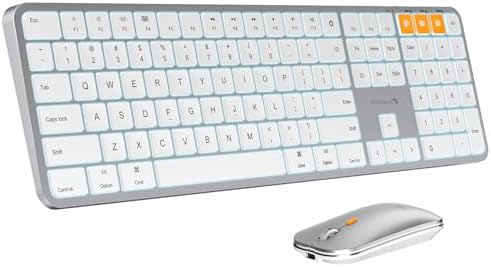
Not everyone wants a hobby. The ProtoArc KM100-A is a backlit Bluetooth keyboard and mouse combo built for Mac, in space gray, and it is the right answer for a specific person: someone who types on a laptop all day, wants a quieter desk setup, and does not want to learn what a stabilizer is.
This is a wireless combo, not a hot-swap mechanical board, and that distinction is the whole review. You give up switch choice, you give up the ability to swap anything, and in exchange you get a quiet, slim keyboard that pairs over Bluetooth and a matching mouse in the same box. The backlight matters more than people admit if you work at night with the lights low, and the space gray finish is the closest match you will get to a modern Mac without paying Apple prices.
If you are the person who reads a switch chart for fun, skip this one. If you are the person who wants the desk to stop being a project, this is the sane purchase.
How I test
Every board gets the same treatment. Two weeks of daily typing, minimum, because a keyboard that feels great for an hour can wear on you by day ten. A stabilizer rattle test on the shift, enter, and spacebar keys, pressing each one at both edges and the middle, because rattle is the single clearest tell of build quality. Cheap boards all rattle. It is the first thing I listen for and the last thing I forgive.
Then the blind test: two boards, eyes closed, type the same paragraph on each, and see which one disappears. A board that disappears is a board you can live with. A board you keep noticing is a board you will sell in three months.
I also check the boring things, because they are the ones that decide whether a board survives a year. Are the switches hot-swap? Are the keycaps PBT or ABS? Does the software need an account to change the backlight? That last one is a pet peeve, and it is disqualifying.
What actually matters, in order
Hot-swap sockets first. This is the feature that turns a purchase into a platform, and it is why the ASUS board above is easy to recommend and why a soldered board is a commitment rather than a purchase.
Keycaps second. A cheap set of ABS caps feels worse than a cheap case, and PBT caps cost the manufacturer very little more. When a board ships PBT, that tells you the brand was paying attention.
Stabilizers third, and this is where budget brands save money. A rattly spacebar ruins an otherwise good board, and the fix is either lube and tuning, which takes an evening, or buying a different board. If you are not willing to tune stabilizers, buy the board that does not need it.
Switches fourth, not first. Counterintuitive, but the switches are the easiest part to change later. If the board is hot-swap and the caps are PBT, you can fix a mediocre switch choice for the price of a set of Milky Yellows. You cannot fix rattly stabilizers or a soldered PCB nearly as cheaply.
Wireless last, and only if you need it. Wireless is a feature until the battery dies mid-sentence. A wired board never has that problem, and the cable is a smaller inconvenience than a dead keyboard at the wrong moment.
The mechanical keyboard reference table
This is the table I keep when people ask me what to buy in what order. Prices change, so check the listing rather than trusting a number you read somewhere.
| Product | What it is | Switch type | Best for | Price |
|---|---|---|---|---|
 Visit on Amazon → Kailh Series Mechanical Keyboard Switches Sample Pack (20pcs) |
Sample pack, 20 pieces | Mixed Kailh | Your first purchase, before any board | $14.99 |
 Visit on Amazon → Gateron Milky Yellow Pro V2 Linear Switches, 90PCS |
Full set, 90 pieces | Linear | Filling a hot-swap TKL, 75, 65, or 60 percent board | $21.99 |
 Visit on Amazon → ASUS ROG Strix Scope II X Wired USB Mechanical Gaming Keyboard |
Full-size, hot-swap, wired USB | Pre-lubed ROG NX Snow V2 linear | One board that does everything, PC and Mac | $104.99 |
 Visit on Amazon → ProtoArc KM100-A Backlit Bluetooth Keyboard and Mouse for Mac, Space Gray |
Wireless keyboard and mouse combo | Not a hot-swap mechanical board | Quiet Mac typing without the hobby | $59.99 |
The order in that table is the order I would buy them in if I were starting over. Samples first, a full switch set second, the board third, and the quiet wireless combo only if you have decided you do not want the hobby at all.
Should you buy the ASUS ROG Strix Scope II X?
Yes, if you want one full-size board and you never want to solder. Hot-swap sockets, PBT keycaps, pre-lubed linear switches, wired USB, PC and Mac support. It is the board that lets you change your mind about switches later, which is the most valuable thing a keyboard can do for a beginner.
The honest tradeoffs: it is full-size, so it takes desk space, and it is wired, so there is a cable. If either of those is a dealbreaker, this is not your board.
Should you buy the Kailh sample pack?
Yes, and buy it first. Twenty switches for less than the cost of a movie ticket gets you out of the guessing phase in an afternoon. Just do not expect to fill a board with it. It is tuition, and it is the cheapest tuition in this hobby.
Should you buy the Gateron Milky Yellow Pro V2 set?
If you own a hot-swap board and you want to know what a clean mid-weight linear feels like, yes. Ninety pieces is a full board's worth for a TKL or smaller, and it is the set I recommend to people who say they want something that "just types." If your board is full-size, order two packs or plan to leave the numpad switches alone.
Should you buy the ProtoArc KM100-A?
Only if you want the opposite of everything above. It is quiet, wireless, backlit, built for Mac, and it is not a mechanical hot-swap board. If your goal is a calm desk and zero switch research, this is the one. If your goal is a keyboard you will open up and tune on a Sunday, it is the wrong purchase.
The order I would buy these in
Sample pack first, so you know what you like. Gateron set second, so you have something to put in a board. The ASUS board third, because it is hot-swap and you can install that set the day it arrives. The ProtoArc combo last, and only if you have decided the hobby is not for you.
That order costs the least when you get it wrong, and it means the keyboard you end up typing on for the next three years is one you chose with your fingers instead of a product page.