Related: How to Lube Mechanical Keyboard Switches Without Ruining Them
I type for a living. Eight hours of code a day, then another two or three hours of forum reading, group buy tracking, and arguing with strangers about stabilizers. That is roughly 20,000 words a week on whatever board is sitting on my desk, and it is the only test that has ever told me anything useful. This mechanical keyboard buying guide is the short version of what I know: four picks I would actually keep, one small tub of grease that fixes the thing that makes cheap boards feel cheap, and the questions I ask before I spend my own money.
Switch feel is personal. "Best" is a lie without knowing whether you type or game, whether you want thock or clack, and whether you have ever used a number pad on purpose. So instead of pretending there is one winner, I split this into roles. One board for people who want the most keyboard for the money. One for wired gaming with zero fuss. One compact 75% board for a crowded desk. And one tube of lube that turns a rattly board into one you stop noticing.
Two weeks of daily typing is my minimum before I form an opinion. Unboxing videos are not reviews. If a board still annoys me on day twelve, it does not get a recommendation, no matter how good the spec sheet looks.
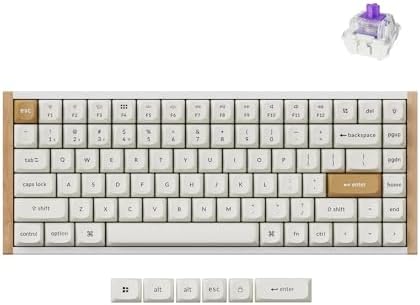
Best Overall: Keychron K2 HE Rapid Trigger Wireless Magnetic Custom Keyboard
Keychron is the best value brand in this hobby. The Q series feels like boards twice the money, and the K series is the entry point I hand to friends who are curious but not ready to solder anything. The K2 HE takes that chassis and swaps in magnetic switches with adjustable actuation and rapid trigger, which is the one analog feature I have stopped calling marketing. Rapid trigger resets a key the instant you start lifting your finger, so repeated presses come faster. In a game that is real. In a document it is invisible, which is fine, because the rest of the board carries it.
Wireless is a feature right up until the battery dies mid-sentence, so I test battery life the way I test switches: use it for a full week and note when the low battery warning actually shows up. That is the only battery test that counts. The K2 HE is a 75% board, so arrow keys and a function row survive while the number pad does not. On my desk that is the difference between the mouse fitting next to the keyboard and the mouse living on top of my notes.
Hot-swap is non-negotiable in 2026. Soldering is a hobby, not a requirement, and the HE platform lets you pull and reseat the magnetic switches instead of breaking out an iron. If you want one board that covers a full work week and a weekend of gaming, this is the one I would hand you first.
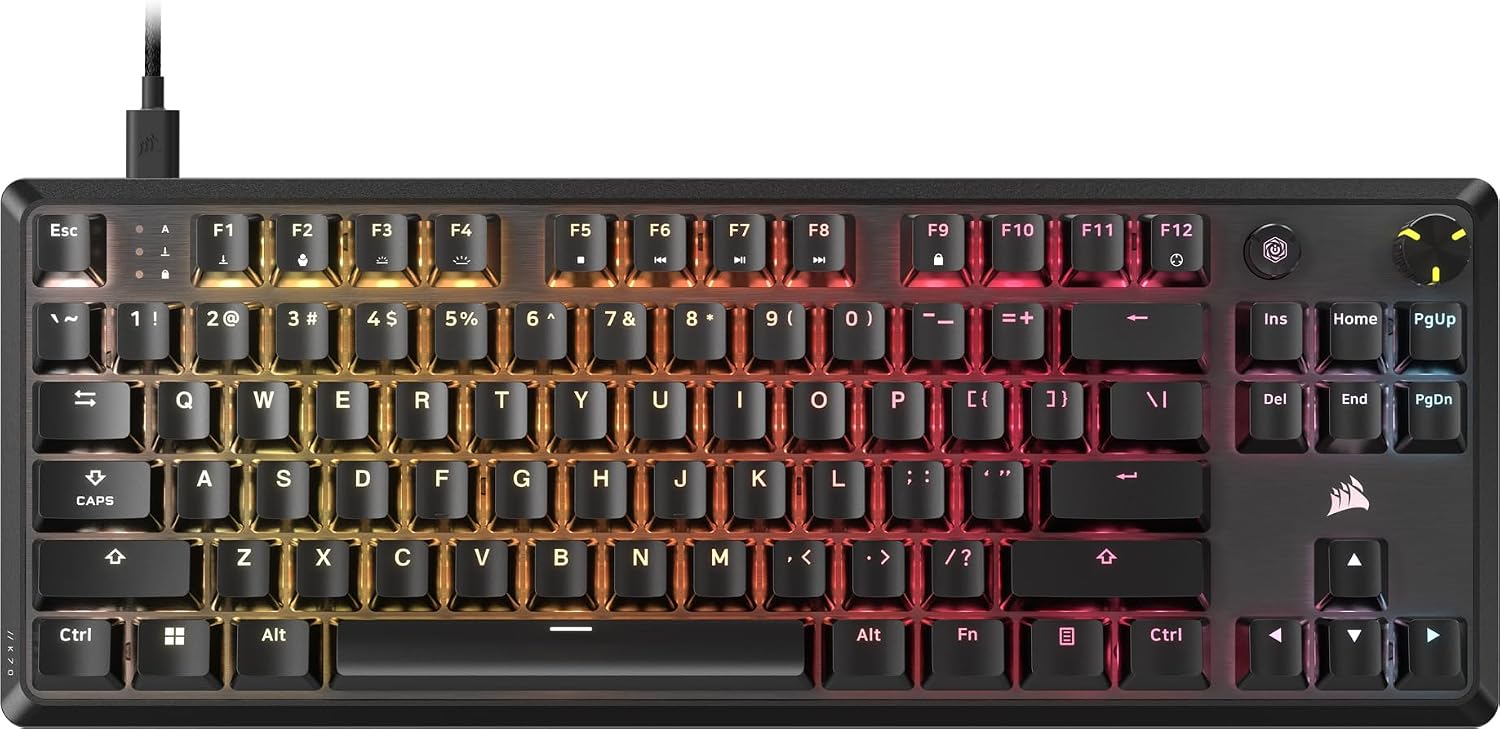
Best Value: Corsair K70 CORE TKL RGB Tenkeyless Mechanical Wired Gaming Keyboard
Gaming-brand boards with rattly stabilizers are my pet peeve, and the K70 CORE TKL is the one that mostly dodges the trap. It is tenkeyless, so no number pad, and it is wired, which means 1000Hz polling and no charging cable to hunt for. For a desktop setup that never moves, that is a feature, not a compromise.
The switches are pre-lubed MLX Red v2 linears. Pre-lubed from the factory is not the same as a careful hand lube, but it gets you most of the smoothness and most of the sound, and it means you can use the board on day one without opening anything. The case has sound dampening inside, which is what keeps a plastic-housing board from sounding like an empty cereal box.
SOCD is in the spec sheet and it is worth understanding before you buy. It resolves simultaneous opposite inputs, so holding left and right does not make your character stutter. That is a competitive gaming feature. It does nothing for typing, and Corsair knows its audience.
The honest compromise is the keycaps. ABS double-shot means the legends will not rub off, but ABS shines where your fingers rest, and it will look glossy within a year of heavy use. Keycap quality tells you more about a board than case material does, so if the shine bothers you, budget for a PBT set later.
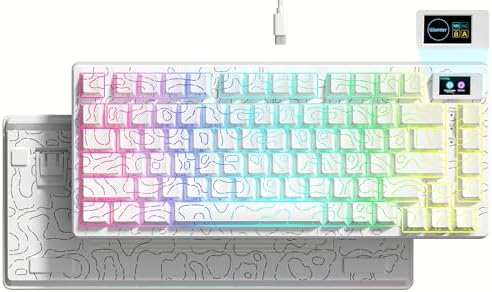
Best Budget Pick: Womier SK80 75% Keyboard with Color Multimedia Display Gaming Keyboard
Budget boards are where stabilizers save money. Womier and Epomaker win the budget wars on price and lose a little on the spacebar, and the first thing you should do with any of them is press the spacebar slowly and listen. A metallic ping means the stabilizer needs lube. That is a fifteen minute fix, not a reason to return the board.
The SK80's draw is the 75% layout plus a small color display for volume and media control. The display sounds like a gimmick, and half of it is, but a physical readout of your volume level is genuinely nicer than a keyboard shortcut that may or may not be captured by whatever app currently has focus. In a call, mid-screen-share, that matters.
75% is the layout I recommend most to people who are not sure. You keep the arrow keys and the function row, you lose the number pad, and the desk gets noticeably less crowded. If you spend your day in a spreadsheet, get a full size or a separate pad. If you spend your day in a code editor, this is the shape you want.
The Cheap Fix: GPL 205 G0 and GPL 105 Switch Lube
This is the single best purchase in this guide, and it is not a keyboard. It is two 10 gram tubs: GPL 205 G0, a thick grease for stabilizer housings and wires, and GPL 105, a light oil for springs. Together they fix the two sounds that make an expensive board feel cheap.
Rattle is the metallic ping of a loose stabilizer wire. Lube the wire ends and the housing where the stem travels, brush it on thin, and the spacebar goes from a rattle to a thud. Do not drown it. Too much grease makes the key sluggish and it will feel worse than the rattle you started with.
Spring ping is the other one, a faint ringing after each keystroke. A thin coat of GPL 105 on the spring kills it. Two rules: never lube clicky switches, because the lube destroys the click, and go light on tactile leaves or you will sand the bump off and end up with a mushy linear.
Ten grams is far more than one board needs. I have never finished a tub, and I have lubed a lot of stabilizers. If you own a board that rattles and you are not ready to buy a new one, buy this instead.
How I tested
Every board gets two weeks of daily typing before I say anything about it: eight hours of code plus an evening of writing, which is the workload that exposes a bad spacebar, a chattering switch, or a layout that fights my hands. Then I run the same three checks.
The stabilizer rattle test: press space, backspace, shift, and enter slowly, then tap them fast. Slow presses reveal wire rattle, fast taps reveal return rattle. Then the switch feel comparison, with eyes closed, so I am judging the bump and the bottom out instead of the keycap legend. And the hot swap check: pull a switch, reseat it, and see whether the socket still grips it firmly.
Wireless boards get a battery week. I do not run a synthetic loop. I use the board normally and note when the warning appears, because that is the only number that matches real life.
The final question is the one that matters: would I use this for a full work week, Monday through Friday, without swapping it out for something else on Wednesday.
Analysis and test results
Layout is the first decision, and most people get it backwards. A 75% board compresses the function row, arrow cluster, and main block into one tight rectangle. A tenkeyless board keeps the standard spacing and just deletes the number pad. Both give you arrows and a function row. The 75% saves more desk space and costs you a little muscle memory while you adjust. If you have ever used a number pad for real work, neither one is for you.
Switch type is the second decision. The Corsair ships with pre-lubed linear switches, which means a smooth, quiet, straight down press with no bump. The Keychron's magnetic switches are also linear in feel, but they add adjustable actuation and rapid trigger, which is a gaming feature that resets the key the instant you lift. The Womier is a layout and desk-space play first, and I would judge its switches by ear after the stabilizer fix.
Wireless versus wired is the third. Wired means 1000Hz polling and no charging, which is exactly right for a desktop that never moves. Wireless means a cleaner desk and one more thing to remember, and I say that as someone who tests battery life like it is a sport.
Keycaps are the quiet variable. ABS double-shot, which the Corsair uses, will not lose its legends, but it shines with use. PBT resists shine. Cheap caps feel worse than cheap cases, so if a board feels off in your hands, look at the caps before you blame the case.
And then there is the lube. A tub of GPL 205 G0 and 105 costs less than a keycap set and fixes the loudest complaint about budget boards. It is the highest return per dollar in this entire hobby.
The mechanical keyboard reference table
This is the table I keep when people ask me what to buy. Layout and switch type are the two columns that decide whether a board fits your hands and your desk.
| Pick | Layout | Switch type | Who it is for |
|---|---|---|---|
 Visit on Amazon → Visit on Amazon →Keychron K2 HE |
75%, wireless | Magnetic, adjustable actuation | One board for work and gaming |
 Visit on Amazon → Visit on Amazon →Corsair K70 CORE TKL |
Tenkeyless, wired | Pre-lubed MLX Red v2 linear | Desktop gaming, no charging |
 Visit on Amazon → Visit on Amazon →Womier SK80 |
75%, media display | See product | Small desks on a budget |
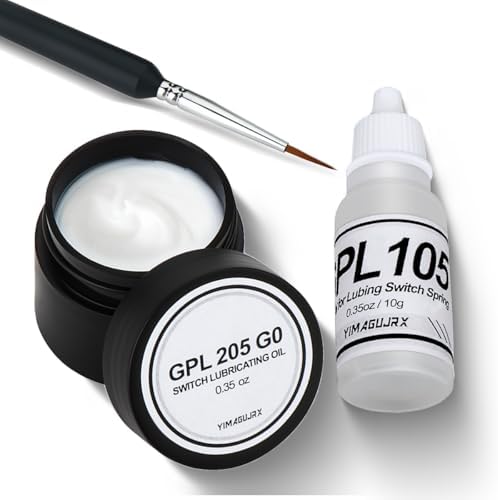 Visit on Amazon → Visit on Amazon →GPL 205 G0 and 105 |
Not a board | Stabilizer grease and spring oil | Fixing a rattly spacebar |
What 75% actually costs you
The adjustment period is real and it lasts about a week. Your right hand reaches for the arrow cluster and finds it one row closer than your old board. After that you stop noticing, and the desk space you get back is worth it. What you genuinely lose is the number pad, and no amount of firmware layers makes a spreadsheet pleasant on a 75%.
Why tenkeyless still wins for gaming
Tenkeyless keeps the standard spacing, which means no relearning anything, and it puts the mouse closer to the WASD cluster. On a wired board you also get 1000Hz polling with no battery involved. If your keyboard never leaves the desk, the cable is not a compromise, it is one less thing to think about.
Should you buy the Keychron K2 HE?
Yes, if you want one board that does both jobs. Keychron is the best value brand in this hobby, and the K2 HE pairs a 75% wireless chassis with magnetic switches and rapid trigger that I have stopped calling marketing. Two weeks of daily typing is the test, and this is the board I kept coming back to when I was supposed to be testing something else.
The tradeoffs are the ones you already know. No number pad, a week of muscle memory retraining, and a battery you have to remember exists. None of that matters if you want a clean desk and a keyboard that handles a full work week and a weekend of games.
Should you buy the Corsair K70 CORE TKL?
It depends on whether you need wired. The pre-lubed linear switches are smooth and quiet out of the box, the sound dampening kills most of the hollow ping, and 1000Hz polling on a cable means no battery anxiety ever. SOCD is there if you play competitively, and it is irrelevant if you do not.
The ABS double-shot keycaps are the compromise. Durable legends, but they will shine over time where PBT would not. If you game on a desktop and never want to think about charging, this is the straightforward pick. If you want wireless, look at the Keychron.
Should you buy the Womier SK80?
Yes, if your desk is small and your budget is tight. The 75% layout is the right shape for most people, and the color display earns its place every time you adjust volume mid-call. Just budget fifteen minutes on day one to listen to the spacebar and lube the stabilizers if it pings. That one fix is the difference between a budget board and a cheap one.
Should you buy the GPL 205 G0 and 105 lube?
Yes, before you buy any other board on this list. If your current keyboard rattles, this is the fix, and ten grams of each will outlast several boards. Lube the stabilizers thin, oil the springs lightly, and leave clicky switches alone. It is the cheapest upgrade in the hobby and the one I recommend most often.