Related: Best Budget Mechanical Keyboards for Typing All Day
I have built 14 custom boards. I own more sets of switches than I own socks, and there is a shelf in my apartment that exists purely because my roommate negotiated it into the lease. So when people ask me which budget hot-swap mechanical keyboards are actually worth buying, they expect a long answer. The real answer is short: the board you stop noticing after a week.
That is the whole test. Type on something for seven days and if you are still thinking about the keyboard instead of the code, it failed. Type on it for two weeks and forget it exists, and it passed. Everything below is filtered through that, plus the two checks I run on every board that lands on my desk: the stabilizer rattle test, and a switch comparison with my eyes closed.
Hot-swap is the reason this list exists at all. Soldering is a hobby, not a requirement, and in 2026 there is no reason to buy a board where the switches are permanent. If you can pull a switch with a $6 tool, a board that feels wrong today can feel right next month. That single feature is what separates a budget board you keep from a budget board you resell.
Here is how the four pieces in this roundup fit together, and who each one is actually for.
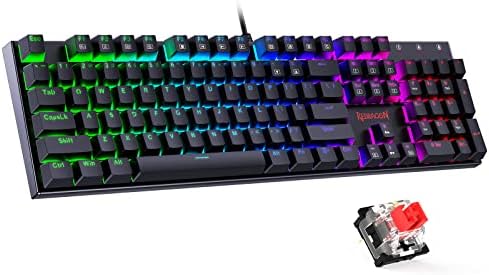
Best Overall: Redragon Mechanical Gaming Keyboard Wired
This is the one I would hand to most people, and it comes down to two lines on the spec sheet. Hot-swappable Red switches mean you can change your mind about feel without a soldering iron. Double-shot PBT keycaps mean the legends will not shine into a greasy blur in six months, which is what happens to the ABS caps on most boards at this price.
PBT double-shot is the detail I look for first, because keycaps tell you more about a board than the case does. Cheap caps feel worse than cheap cases. A brand that spends on double-shot PBT on a budget board is telling you where it decided not to save money, and Redragon spent it in the right place.
The rest of the package is sensible. Anti-ghosting matters if you game on the same board you work on, and 11 programmable backlit modes give you something to tune without needing an account and a cloud login, which is my personal pet peeve with a lot of software-driven boards. It is wired, it works with PC and Mac, and the Red linear switch is a safe default: light enough for long typing sessions, predictable enough for games.
Wired is not a compromise here, it is the point. No battery to think about, no latency question, no dongle to lose. If your desk already has a cable running to it, this is the board that removes a decision from your day.
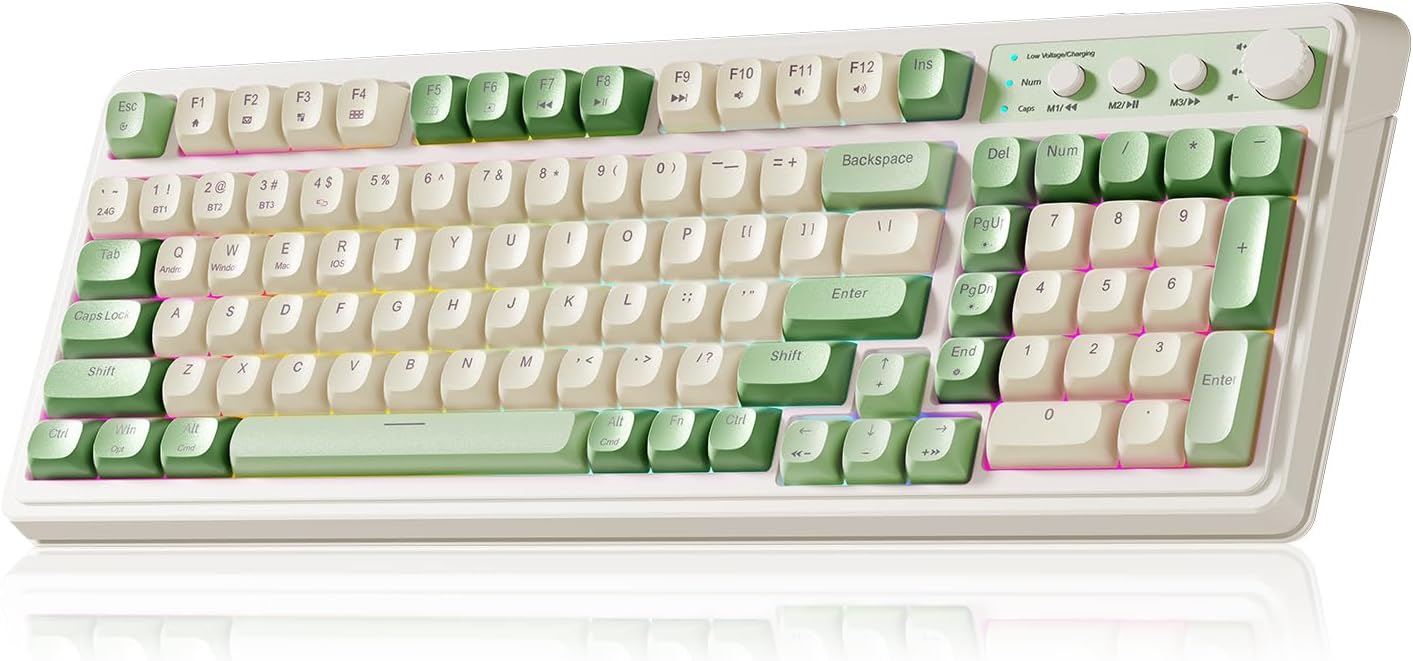
Best Value Wireless: AULA S99
The S99 is the board for the desk that is trying not to look like a server rack. Wireless, and in a green creamy colorway that does not look like every other black rectangle in this category. If you have ever looked at your setup and thought it needed fewer cables and less aggression, this is the pick.
I treat wireless as a feature with a bill attached. You are trading a cable for a battery, and a battery is a thing that dies mid-sentence. That is not a knock on this board specifically, it is how I think about every wireless keyboard I have ever used: convenience during the week, a charging cable on Friday. Know that going in and you will be happy. Expect a wired board's permanence and you will be annoyed.
For a budget wireless board, the value proposition is straightforward. You get the cable-free desk, the colorway, and a second board you can move between a laptop and a desktop without crawling under the desk. It is the one in this group that solves a problem the other three do not have.
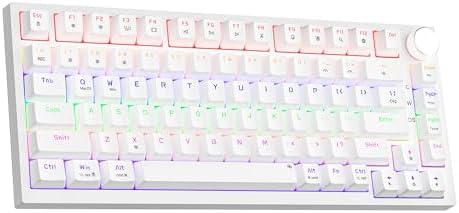
Best Compact Pick: Newmen GM326
The GM326 is a 75 percent board, and 75 percent is the layout I recommend to anyone who has never owned a compact keyboard. You keep the arrow cluster and the function row. You lose the number pad. That is the trade, and for most people it is a good one: shorter reach to the mouse, more desk for the mouse to move across, and no relearning where your fingers go.
This is the wired option in the compact slot. If you work with a laptop on the same desk, the smaller footprint is the entire argument. A full-size board and a laptop on a small desk is a negotiation you lose every day.
The reason it earns a spot here is that compact layouts are where budget boards usually get weird. Manufacturers shrink the case and then cut the stabilizers, and the spacebar starts sounding like a spoon in a coffee can. That rattle is the first thing I listen for on any board, and it is the single biggest difference between how a $50 board feels and how a $200 board feels. Compact does not have to mean rattly, but compact is where you should check.
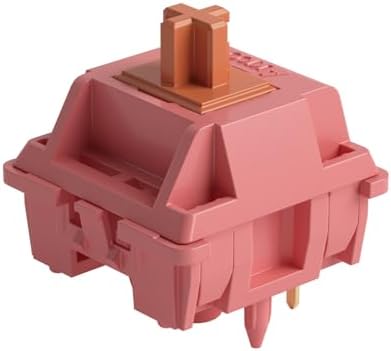
Best Switch Upgrade: Akko Rosewood Switches
This is the piece that turns a board you tolerate into a board you like. The Rosewood is a 40 gram linear, which is light. Light linears are what I recommend to anyone who types for a living and has never thought about switch weight, because they are the least tiring thing to type on for eight hours.
Pre-lubed is the other half of the pitch. Lube is the cheap fix for everything that sounds or feels wrong, and factory lube saves you an afternoon with a brush and a tiny jar. A pre-lubed switch will feel smoother than a dry stock switch on day one, which matters most when you are comparing a budget board against a nicer one.
Two things to check before you order. First, 45 pieces is a set for a small board or a partial swap, not a full-size keyboard. Count your layout: a 75 percent or a TKL needs more than this. Second, these are 5-pin switches, which fit boards with the matching PCB holes. If your board takes 3-pin switches, the two plastic locating legs can be clipped flush with a pair of flush cutters. It takes a few minutes and it is the difference between a switch that seats and a switch that sits crooked.
How I test budget boards
Every board gets the same treatment, no exceptions, because unboxing videos are not reviews.
Two weeks of daily typing. Not a weekend, not an afternoon of gaming. Two weeks of real work, eight hours a day, on whatever I am actually writing or coding. Most boards reveal themselves in the first three days. The rest reveal themselves on day nine, when the honeymoon is over and you notice the thing you have been ignoring.
The stabilizer rattle test. Spacebar, left shift, right shift, enter, backspace. Press each one slowly and listen for the metallic ping. This is the build quality tell on every budget board, and it is the first thing to go wrong when a brand saves money in the wrong place. A rattly spacebar makes an otherwise good board feel cheap.
The blind switch comparison. I line up boards with the same switch type, close my eyes, and type the same paragraph on each. Sound is 50 percent keyboard and 50 percent desk, so I do this on the same desk, same chair, same day. If I cannot tell them apart with my eyes closed, the more expensive one has to justify itself some other way.
And then the real question: would I use this for a full work week? Not could I. Would I. That is the test that kills most boards for me.
What the specs actually tell you
Hot-swap is the line I will not cross. If a board is soldered, it is a dead end, no matter how good it feels on day one. Your taste in switches will change. Mine did, three times. Hot-swap means that change costs you the price of a switch set instead of the price of a new board.
Keycaps are the second tell. Double-shot PBT resists the shine that ABS develops, and shine is what makes a two-year-old board look like a ten-year-old board. When I see PBT on a budget listing, I assume the brand is serious. When I see ABS with no mention of material, I assume the keycaps are the first thing that will disappoint you.
Sound is the thing you cannot read off a spec sheet. Thock is the deep sound everyone chases, and it comes from the combination of case, plate, switches, keycaps, and whatever your desk is made of. Two identical boards on a wood desk and a glass desk sound like different products. If a board sounds hollow, the tape mod is the cheap fix. If it sounds thin, thicker keycaps help more than anything else you can do.
And stabilizers are where the money went. Lube them, or buy a board where someone already did. Rattle is the first thing I listen for and the last thing people think to check.
Budget hot-swap mechanical keyboard comparison
| Board | Connection | Switch setup | What stands out | Price |
|---|---|---|---|---|
 Visit on Amazon → Visit on Amazon →Redragon Mechanical Gaming Keyboard Wired |
Wired | Hot-swappable Red switches | Double-shot PBT keycaps, anti-ghosting, 11 programmable backlit modes | $29.99 |
 Visit on Amazon → Visit on Amazon →AULA S99 Gaming Keyboard |
Wireless | Mechanical | Green creamy colorway, cable-free desk | $35.99 |
 Visit on Amazon → Visit on Amazon →Newmen GM326 Mechanical Keyboard |
Wired | Mechanical | 75 percent layout, keeps arrows and function row | $23.99 |
 Visit on Amazon → Visit on Amazon →Akko Rosewood Keyboard Switch |
Switch set, 45 pieces | 5-pin, 40gf linear, pre-lubed | Drop-in upgrade for a hot-swap board | Check current Amazon price |
The way to read this table is by column, not by row. Connection decides whether you are charging something. Switch setup decides whether you can change your mind later. What stands out is the thing you will notice in week two, when the new-board feeling has worn off and you are just working.
The one combination I would actually build
If I were buying today and had to pick two items instead of one, I would take the Redragon and the Rosewood switches together. Hot-swap board plus a light pre-lubed linear is the cheapest version of the hobby that still feels like the hobby. You get PBT caps that survive, a case that does not rattle like a tin can, and switches you chose instead of switches you settled for. Count your switches before you order, though. 45 pieces will fill a small board, not the Redragon.
Should you buy the Redragon Mechanical Gaming Keyboard Wired?
Yes, and this is the easiest call in the group. Hot-swap means you are never stuck with the switches that came in the box. Double-shot PBT keycaps mean the board still looks like a board in a year. Anti-ghosting and the backlit modes cover the gaming side without turning the software into a login screen.
It is wired, which I consider a feature on a desk that already has cables. If you want one board that does typing and gaming and does not ask you to think about it again, this is the one.
Should you buy the AULA S99?
Yes, if wireless is the reason you are shopping. The cable-free desk is real, and the green creamy colorway is genuinely different from everything else at this end of the market.
Just go in with the right expectation. Wireless trades a cable for a battery, and batteries die at the worst possible moment. Keep a charging cable within reach and it is the nicest-looking setup in this roundup.
Should you buy the Newmen GM326?
Yes, if your desk is small and you still use arrow keys. The 75 percent layout is the sweet spot for compact boards: everything you actually touch, minus the number pad you stopped using years ago.
It is wired, so there is nothing to charge. Check the stabilizers first thing when it arrives. That is where budget compact boards save money, and it is the first thing you will hear.
Should you buy the Akko Rosewood switches?
Yes, if your board is hot-swap and you want a light, smooth linear. 40 grams is easy on your hands over a long day, and pre-lubed means you skip the part of the hobby that involves a brush, a jar, and an evening.
Order the right count and check your pin compatibility. 45 switches is a small board or a partial swap. Five-pin switches drop into boards with matching holes, and they can be clipped to fit the rest. Do that and this is the cheapest real upgrade in this entire guide.