The AULA F75 Pro Made Me Question Everything I Knew About Keycaps
The AULA F75 Pro is marketed as a budget board with premium feel, and I've been typing on mine for about six months now. The gasket mount is genuinely good, the Leobog Reaper switches are pre-lubed and smooth, and the battery genuinely runs on wizard energy. But the keycaps? They're where the budget shows.
Here's the thing nobody tells you when you're comparing keyboard keycap materials: the keycaps are the part of the keyboard you actually touch. The switches matter, sure, but your fingertips spend every working hour on those little pieces of plastic. I've got a drawer full of keycap sets I've swapped out over the years, and I've learned exactly what works and what doesn't.
Let me break down what I've actually learned living with these materials.
ABS Keycaps: What the AULA F75 Pro Ships With
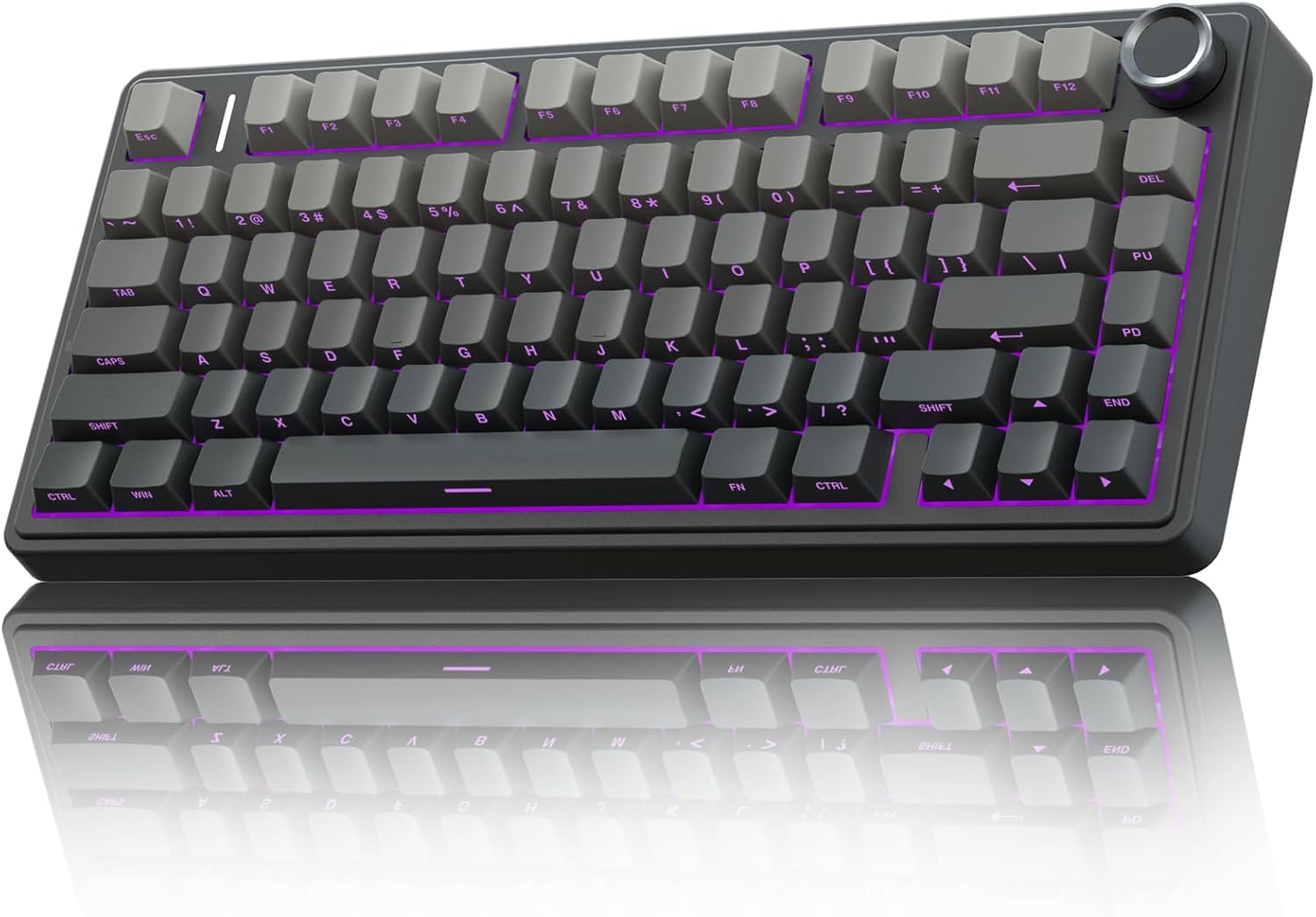
The AULA F75 Pro comes with ABS keycaps, and after two weeks of daily use, I can tell you exactly what that means.
The legends are on the front. South-facing. So "letters on key cannot be seen from top," which is the #1 complaint in every single thread about this board. I'm a touch typist, so it doesn't bother me, but if you look down at your keys while you type, it will drive you absolutely insane.
The material itself is fine. Smooth, slightly glossy after months of use, but not gross. The bigger issue is the thickness. These are thin-wall ABS caps, and you can feel it in the sound. They're not terrible, but they're not the creamy, thocky sound the board is capable of with better caps.
I swapped mine out for a set of PBT caps after about a month, and the difference was immediate. The sound got deeper. The feel got grippier. The board went from "great budget board" to "why does this cost ~$60?"
Choose the AULA for the switches, the battery, and the gasket mount. Just know you'll probably want to replace the keycaps eventually.
PBT Keycaps: The Upgrade Path
PBT is the material most enthusiasts end up on, and for good reason. It's denser, more textured, and doesn't develop that shiny, worn-in look that ABS gets after a few months of heavy typing.
I've got a set of PBT caps on my AULA right now, and the difference is genuinely night and day. The sound is deeper, the texture is grippier, and my fingertips don't slide around when I'm typing fast. They also don't show the oil from my fingers the way ABS does.
The trade-off is price. A good PBT set runs ~$30 to ~$60, which is more than some budget keyboards cost. But if you're planning to keep your board for a while, it's the best upgrade you can make. I've had the same PBT set on one of my boards for two years, and it still looks brand new.
The Logitech MX Mechanical's Keycaps
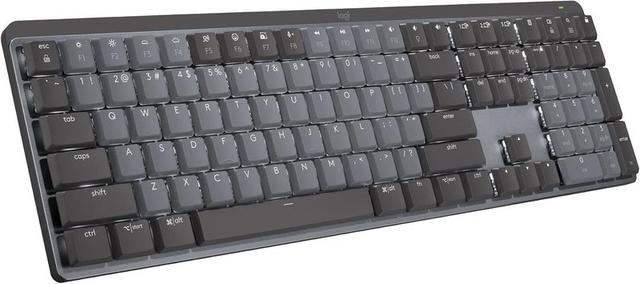
The Logitech MX Mechanical is a ~$150 board, and its keycaps are a weird middle ground. They're not cheap ABS, but they're not full PBT either. They're a proprietary material that Logitech says is "durable" but doesn't specify much beyond that.
After using it for a few weeks, I can tell you the keycaps are fine. They feel decent, the legends are printed on top (thank God), and they don't show wear yet. But they're not the highlight of the board.
The switches are soldered, which is my biggest pet peeve with this board, and the function row is crammed against the number row with no space between them.
I've hit the lock key instead of the minus key more times than I can count.
The keycaps aren't the problem with this board. They're just not the reason to buy it either. You buy the Logitech for the wireless reliability and the build quality. You accept the keycaps as "good enough."
The RK61's Keycaps
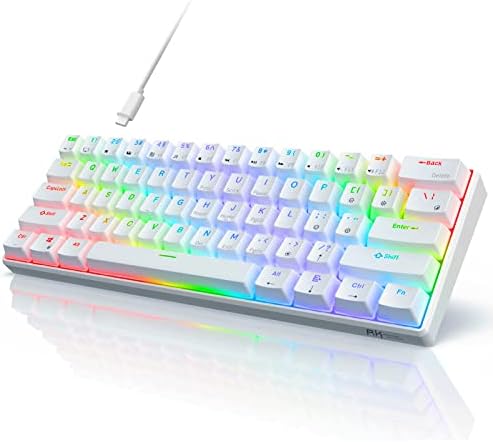
The RK61 was my first board, and its keycaps were a crime. ABS, thin, with legends that started wearing off after about three months. The "W" key was the first to go, probably because I use it constantly, and by month six, the board looked like it had been through a war.
This is the classic budget ABS experience. It's not that ABS is inherently bad. It's that cheap ABS is bad. The plastic is thin, the legends are printed on top instead of double-shot, and they wear out fast.
If you're on an RK61 and wondering if a keycap upgrade is worth it, the answer is yes. A ~$30 PBT set will transform that board more than any other single upgrade.
Double-Shot PBT: The Gold Standard
The best keycaps I own are double-shot PBT. The legends are molded into the plastic, so they literally cannot wear off. I've had a set for two years, and they look exactly like they did on day one.
The downside is price and availability. Double-shot PBT sets run ~$50 to ~$100 depending on the profile and brand. But if you type for a living, it's worth it. The legends won't fade, the texture won't get shiny, and the sound is consistently deep and satisfying.
Which Material Should You Choose?
Here's my honest take after years of typing on all of these.
Choose ABS if you're on a tight budget and you're a touch typist. The AULA F75 Pro's stock keycaps are acceptable, and the board is so good everywhere else that you can live with them. Just know you'll probably want to upgrade later.
Choose PBT if you want the best feel-to-price ratio. A mid-range PBT set will upgrade any budget board immediately, and it's the single best value upgrade in the hobby.
Choose double-shot PBT if you're planning to keep your board for years and you don't want to think about keycaps again. It's more expensive, but it's the last set you'll buy for that board.
Choose the Logitech MX Mechanical if you need a reliable wireless workhorse and you don't care about keycap materials. The stock caps are fine, and the board's strengths are elsewhere.
The AULA F75 Pro is still my daily driver. The gasket mount, the pre-lubed switches, and the absurd battery life make it the best ~$60 I've spent on this hobby. But I replaced the keycaps within a month, and that's the honest truth about where that budget went.
If you're trying to decide between the AULA and something more expensive, get the AULA and spend the difference on a good PBT set. You'll end up with a board that sounds and feels better than boards twice the price. for the AULA F75 Pro. for the Logitech MX Mechanical. for the RK61.
Anyway, my dog Waffles just knocked over my switch tray again. That's my cue to go pick up 30 loose linear switches from under my desk. Happy typing.