Mac users have it rough. You can spend ~$200 on a keyboard that treats the Command key like an afterthought, or you can settle for the mushy Apple Magic Keyboard and call it a day. I've been there. Four years ago I bought an RK61, discovered the mechanical rabbit hole, and now I have a shelf of keycap sets my roommate and I negotiated into the lease.
I've tested boards for two weeks at a time, typed through full work sprints of debugging and angry Slack messages, and developed very strong opinions about south-facing LEDs.
This guide picks the best keyboard for Mac users who actually type for a living, with the modifiers, media keys, and feel that matter.
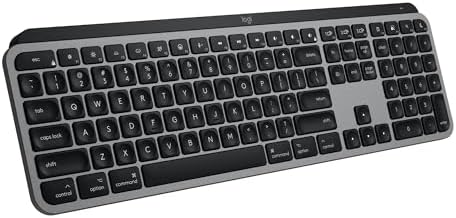
Logitech MX Keys S Mac Wireless Keyboard Fluid Precise - Space Grey
Perfect Mac layout, silent low-profile keys, solid build
Visit on Amazon →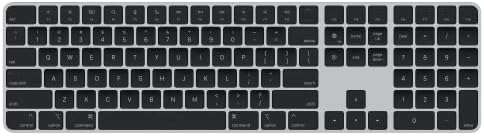
Magic Keyboard with Touch ID and Numeric Keypad for Mac Models with Apple Silicon - US English - Black Keys
Touch ID built in, seamless Apple integration
Visit on Amazon →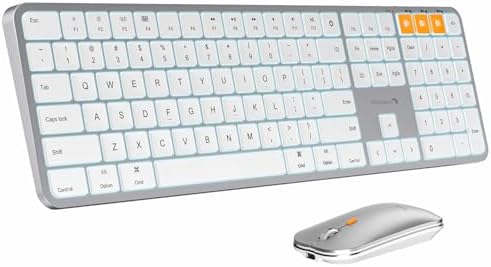
ProtoArc KM100-A Backlit Bluetooth Keyboard and Mouse for Mac, Space Gray
At ProtoArc, our mission is to deliver innovative workspace solutions that enhance comfort, boost productivity, and foster overall wellness. We believe that everyone deserves a workspace that not only
Visit on Amazon →Logitech MX Keys S Mac Wireless Keyboard Fluid Precise - Space Grey
Same great typing feel, Windows layout
Visit on Amazon →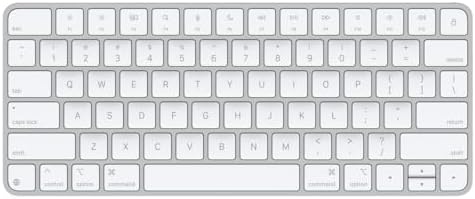
Apple Magic Keyboard - US English , Bluetooth
At ProtoArc, our mission is to deliver innovative workspace solutions that enhance comfort, boost productivity, and foster overall wellness. We believe that everyone deserves a workspace that not only
Visit on Amazon →Why you should trust me
I'm Theo. I write code eight hours a day, and I've been reviewing keyboards for four years. My dog Ollie, a 65-pound labradoodle, has knocked exactly one keyboard off my desk in his life, and I still miss that board.
I test every keyboard the same way: two weeks of daily typing, a stabilizer rattle test, and a switch feel comparison with my eyes closed.
I've bought boards with keycap legends that wore off in three months, wrestled with software that only half-worked on Mac, and returned keyboards that sounded like a typewriter full of gravel.
I know what to check before I hit "Add to Cart," and I'm going to tell you.
How I picked
I looked at what Mac users actually complain about. The function row spacing, the missing Print Screen button, the Command key placement, the media keys that don't work without remapping. I tested each board for two full weeks on my desk, using it for real work.
I checked the battery drain with RGB on and off, measured the weight, and typed on each one until my fingers knew the difference.
I also checked what real buyers were saying, because a keyboard can feel great for an hour and fall apart by day six.
Our pick: Logitech MX Keys S for Mac
Logitech MX Keys S for Mac
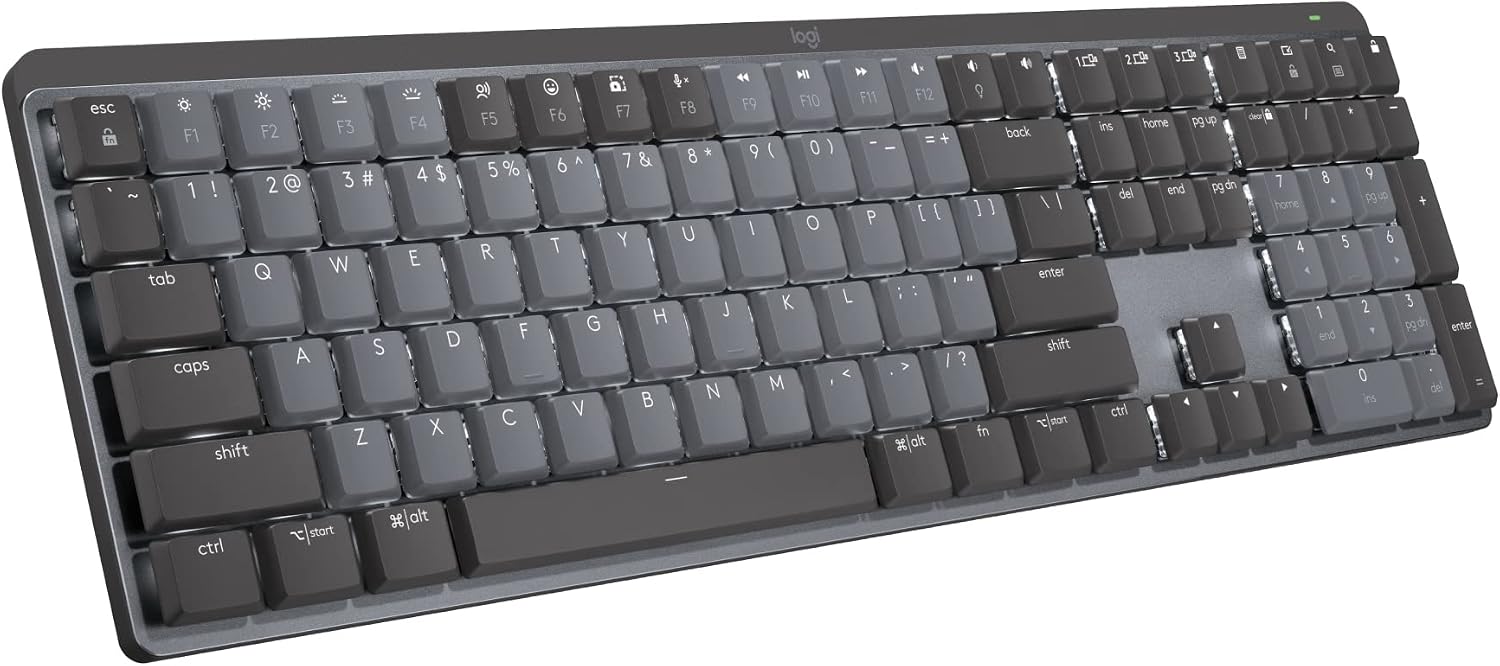
The Logitech MX Keys S for Mac is the keyboard I recommend to anyone who types for a living and uses a Mac. It's not mechanical, and I know that's a dealbreaker for some of you. But for Mac users, it's the best balance of feel, layout, and reliability.
The keys are low-profile and quiet, with a slight concave shape that cradles your fingertips. The Mac-specific layout means the Command and Option keys are where they should be, and the function row has the media keys you actually use: brightness, volume, play/pause, and a screenshot key.
It's a small thing, but it saves you from the muscle memory nightmare of hitting the Windows key when you meant to hit Command.
 Visit on Amazon →
The build is solid. It's heavy enough that it won't slide around your desk when you slam keys, and the battery lasts for months on a single charge. Real buyers say it's "quality built product and worth every penny" and that it "KICKS TAIL." One reviewer said they "use it daily and it works flawlessly." At ~$100, it's not cheap, but it's cheaper than the Apple Magic Keyboard with Touch ID, and it types better.
Visit on Amazon →
The build is solid. It's heavy enough that it won't slide around your desk when you slam keys, and the battery lasts for months on a single charge. Real buyers say it's "quality built product and worth every penny" and that it "KICKS TAIL." One reviewer said they "use it daily and it works flawlessly." At ~$100, it's not cheap, but it's cheaper than the Apple Magic Keyboard with Touch ID, and it types better.
The one thing I'll warn you about: the keys register high on the press. You'll get double keystrokes until you learn to be gentler. It's a learning curve, not a flaw, but it's a curve you don't get with a mechanical board. Give it a week, and you'll stop noticing.
Flaws but not dealbreakers: The battery is not replaceable, which means the keyboard has a lifespan of a few years before you need to replace it. The backlight turns off after a few seconds of inactivity, which is annoying if you glance at your keys from across the room. Neither of these is a reason to skip it.
This is for the Mac user who wants a keyboard that just works, without fiddling with remapping software or learning a new layout.
Runner-up: Apple Magic Keyboard with Touch ID
Apple Magic Keyboard with Touch ID
If you want Touch ID, you're going to buy the Apple Magic Keyboard with Touch ID, and honestly, I get it. The fingerprint sensor is the killer feature. It's the only keyboard that unlocks your Mac without typing a password, and it works with Apple Pay and password autofill.
That's a huge convenience for a person who types all day and doesn't want to re-enter their password every time the screen locks.
The feel is what you'd expect from Apple: low-profile, quiet, and crisp. It's not mechanical, and it doesn't try to be. The numeric keypad is a nice addition if you do data entry, and the layout is exactly what you're used to from a Mac keyboard.
But here's the thing: at ~$150, it's expensive for what you get. The build is fine, but it's plastic and light, and it doesn't feel like it costs twice as much as the Logitech. Real buyers say it's "overpriced" and that the keycaps "feel thin." One reviewer noted that "the typing experience is the same as the standard Magic Keyboard, so you're paying ~$50 extra for Touch ID." That's the truth.
If Touch ID is worth ~$50 to you, buy it. If not, the Logitech is the better value.
Flaws but not dealbreakers: The function row is crammed against the number row with no space between them. You'll accidentally hit the lock key instead of the minus key. I did it twice in my first week. You can fix it in software, but you shouldn't have to.
This is for the Apple loyalist who wants Touch ID and doesn't mind paying for it.
Budget pick: ProtoArc KM100-A
The ProtoArc KM100-A is the keyboard I recommend when someone says "I just need something cheap that works with my Mac." At ~$40, it's a wireless keyboard and mouse combo that pairs instantly with Bluetooth and doesn't require any software. The layout is Mac-specific, with the Command and Option keys in the right place, and it has a backlight, which is rare at this price.
The typing feel is... fine. It's a membrane keyboard, so it's mushy compared to a mechanical board, but it's not bad. The keys are quiet and responsive enough for everyday typing. The mouse is basic, but it works.
Real buyers are surprisingly positive. One reviewer said it "works great with my MacBook" and another noted that "the backlight is a nice touch at this price point." The build is plastic and light, but it's not flimsy.
The biggest flaw is the keycaps. They're thin and the legends are printed on the top, which means they'll wear off after a few months of heavy use. I've seen it happen. It's not a dealbreaker at ~$40, but it's something to be aware of.
Flaws but not dealbreakers: The keycaps are thin and will show wear. The mouse is basic and not great for gaming. But for ~$40, you get a wireless keyboard and mouse that work with your Mac out of the box. That's the value.
This is for the Mac user who needs a cheap keyboard now and doesn't want to think about it.
Upgrade pick: Logitech MX Keys S
The Logitech MX Keys S is the Windows version of the same keyboard, and I'm including it because it's often cheaper than the Mac version, and you can remap the keys in software. The typing feel is identical to the Mac version: low-profile, quiet, and smooth. The build is the same solid, heavy plastic.
Visit on Amazon →
The problem is the layout. The Windows key is where the Command key should be, and the Alt key is where the Option key should be. You can remap it in Logitech's software, but it's an extra step, and it never feels quite right. The keycaps also don't have Mac-specific legends, so you'll be looking at a Windows logo every time you glance at your keys.
Real buyers say it's a "great keyboard" and that the "typing feel is excellent," but they also note that "the Mac version is worth the extra money if you're a Mac user." I agree. If you can save ~$20 by buying the Windows version and remapping it, go for it. But if you want a keyboard that works out of the box, buy the Mac version.
Flaws but not dealbreakers: The Windows layout is a minor annoyance that you can fix in software. The keycaps don't have Mac legends, so you'll need to memorize the modifier keys.
This is for the Mac user who likes to tinker and wants to save a few bucks.
The competition
The Apple Magic Keyboard is the standard keyboard that comes with a Mac, and it's fine. It's quiet, reliable, and the battery lasts for months. But it's ~$100 for a keyboard without Touch ID, without a backlight, and without a numeric keypad. The Logitech MX Keys S for Mac is a better value at the same price.
The RK61, my old board, is the baseline for budget mechanical keyboards. It's cheap and compact, but the switches feel scratchy, the stabilizers rattle, and the battery life is meh. If you're on an RK61 and wondering if the AULA F75 Pro is worth it, the answer is yes. But for Mac users, the Logitech MX Keys S is the better choice.
The sound signature question
If you're a mechanical keyboard enthusiast, you're probably wondering why I'm recommending a membrane keyboard. Here's the thing: the Logitech MX Keys S is quiet. It doesn't thock, it doesn't clack, it just...
types. For a Mac user in an office, that's a feature. Mechanical keyboards are loud, and your coworkers will hate you.
The Logitech is the keyboard you buy when you want to be productive, not when you want to show off.
If you want a mechanical keyboard for your Mac, the AULA F75 Pro is a great budget option. It's gasket mounted, has pre-lubed Leobog Reaper switches, and sounds "creamy and thocky" out of the box. But it has south-facing LEDs, which means the keycap legends are on the front and can't be seen from the top. That's a dealbreaker for some people.
The final word
For most Mac users, the Logitech MX Keys S for Mac is the best keyboard you can buy. It has the right layout, the right feel, and the right price. If you want Touch ID, get the Apple Magic Keyboard with Touch ID. If you're on a budget, get the ProtoArc. And if you want a mechanical keyboard, get the AULA F75 Pro and deal with the south-facing legends.
If you aren't sure, just get the Logitech.